Well yeah I had done one more run with the Suunto GPS pod and decided that it is not any good for pacing. During a run it would show constantly pace around 9:30 - 10:30 per mile while based on my perceived effort I was running more in 8:00 - 8:30 range. When I loaded data to my computer it was indeed the 8:00 - 8:30 range. The GPS pod is great for overall distance tracking and probably does well on mile long splits. But it is of no use in regular road running. I'll stick with the foot pod that provides much better results. So the GPS pod went back to Amazon and I expect refund in the next few days...
Showing posts with label GPS. Show all posts
Showing posts with label GPS. Show all posts
May 4, 2009


April 13, 2009
Suunto GPS pod second try
I have posted about my unpleasant experience with Suunto GPS pod on Suunto Discussions and asked for help from other users. It was recommended to me to give the GPS pod little longer to get better satellite lock and put the GPS pod on the same arm as the watch. I did all this prior to my long run this Sunday and the results were much better this time. As you can see from this picture.

While the pacing info is not as good as from calibrated foot pod it is certainly much better than what I have seen in my first attempt. I have not lost connection between the watch and the GPS pod in the whole 2 hours of the exercise which is good. But what really bothered me was that the pace on the display of the watch was pretty much unusable. But I'm getting little ahead of myself. Let me start with this - I had a long run scheduled for Easter Sunday and I put it off until afternoon. I figured that there will be quite a bit of traffic on the roads I usually run so I took the running to Lehigh Valley Parkway. It is a nice park with great trails on rolling terrain. I thought it will be better for my knees and ankles than the roads. I wanted to test the GPS pod, but I also had second watch RS800cx with S3 foot pod to validate the pace. Well that was the plan anyways. When I was getting ready for the run the RS800cx would not link up with the foot pod (turned out to be a dead battery). Well great I thought, now I'll need to pace based on this GPS unit that I do not really know all that well. After about a mile of glancing at the pace it was clear to me that pacing with this GPS pod will not work. Instead I relied on the perceived exertion and my heart rate. Main reason for that was that the immediate pace in the park was jumping between 9 minute mile and 12 minute mile on my steady pace effort that I would estimate was more around 8:30 per mile. I was not that far off with my estimate - the pace was actually 8:20 which I figured out when I got home. The funny part is that while the pace jumps all over the place the distance gets recorded accurately so you can validate the pacing after the run. This is actually good exercise in listening to your body. I noticed that I often get too hung up on what the watch tells me and listen to my body less than I should.
After all the workout turned out to be a great success - not only did I do the work. I also validated that my perceived exertion is pretty much spot on - I had to run 60 minutes at 8:10 - 9:10 per mile which turned out to be about 8:20 based on the distance. Then the plan called for me to pick up the pace to 7:15 - 7:30 for 30 minutes - which turned out to be 7:33 and then I had 6 pickups to faster than 5k pace with 2 minute recoveries and 5 minutes cool down. After I got home I found out that I did quite well even without the watch telling me how fast I ran. And to some degree it was much better workout - I kept listening to my body and pushed through the rough spots during the session. You know, like when you feel the muscle fatigue that slows you down and you push through it and 100 meters later it feels ok again. I'm thinking about using the GPS pod for this type of workout again to see how my sense of pace improves over time.
What looked like a messed-up workout in the beginning turned out to be a great session. It was excellent practice in pacing without the feedback from the watch. "If life gives you lemons make lemonade," and as Ron White said on radio when I was heading over to the Lehigh Valley Parkway "make sure to find someone with vodka to have a party!".
April 9, 2009
Suunto GPS pod - first run - not so good
Few days ago I saw a good deal on Suunto GPS pod on Amazon and decided to test it out. It arrived last week on Friday, but I did not get to test it until today. Well I could have tested it during the Brandywine Duathlon, but I did not want to use new equipment for the first time in the race. Probably good I decided not to do it.
I actually did a pseudo test with the Suunto T6c + GPS pod and Polar RS800cx + G3 on the day I received the GPS pod. But it was not a real training test. What I did was to put both GPS units in my car and then measure the distance from my house to meeting place with few friends. The result was pretty good - the distance came to about 0.08 difference over 26 miles. Not bad. What I did not look at was the speed reported by the unit during the drive - I had to pay attention to where I was driving.
Today was the first real test of the GPS pod with T6c in an easy recovery run. Plan was to run at 8:30 - 9:40 pace for about 20-25 minutes. Easy enough to pay attention to what the GPS unit does and how well it reports the instantaneous pace. I started the GPS pod inside the house and set it by the window until it acquired the signal and then I walked out of the door. The GPS pod blinked like mad so I assumed it lost connection and I stopped for about 30 second and let it get satellite lock again. When the blinking slowed down I started moving again. The pace was all over the place and quite often I lost connection and the pace was showing -:--/min which is not very useful. On top of this the first 4 minutes the comfort belt rebelled and locked my HR at 180 beats which is quite impossible for me since my max is about 8 beats lower. After the run I looked at the exercise file and was not surprised to see this:
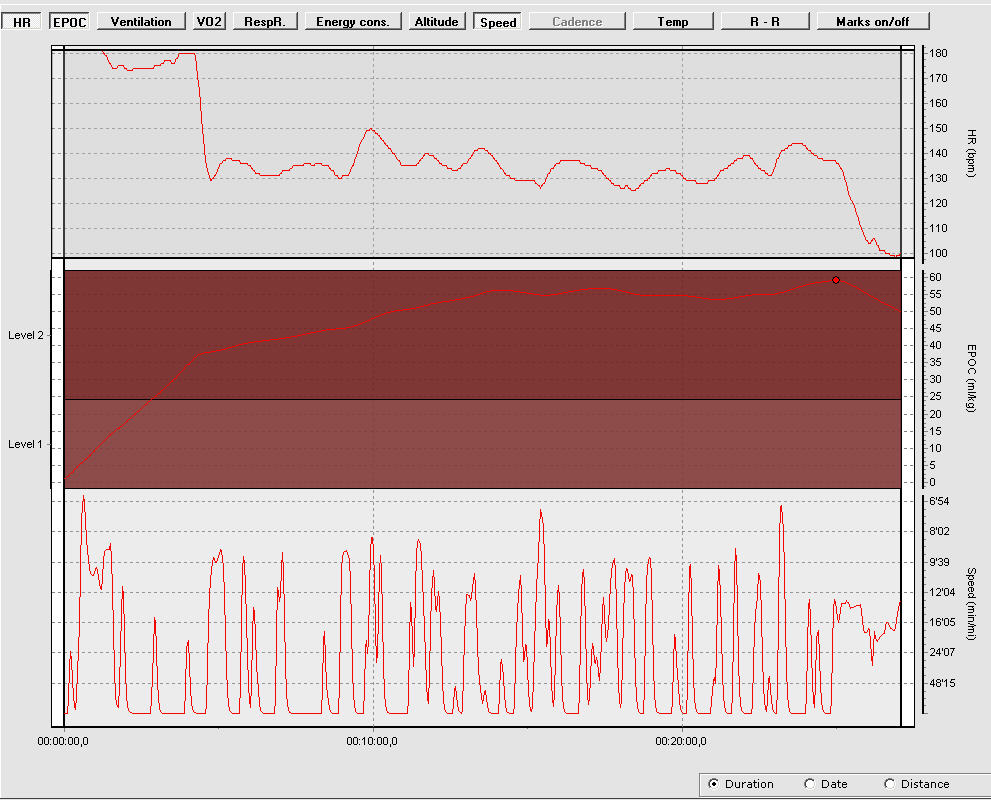
The top graph is HR, middle line is EPOC and the third line is the pace. It is really a sad picture. I looks like the GPS pod was either losing connection to the satellites or to the watch. I do not really know what was happening, but most of the time my pace was showing -:--/min which does not really tell you whether the satellite lock is gone or the connection to the watch.
If there is a GPS pod user out there that has working GPS pod I would want to know how you use it. E.g. how long do you want before you start moving? Are you wearing the pod on your arm? Same arm as watch or it does not matter? Any other hints will be appreciated. If I can not sort this out over the next few days I'll just pack the unit and send it back to Amazon for refund.
November 20, 2007
User Review of the Polar G3 sensor for RS800
As I promised on few forums I finally got to sit down and write few words about the new G3 GPS sensor from Polar. I have bought it about a week after it was released in the US and since then ran few times with it. The following is account of actual user of the G3 unit and not like some reviews an opinion based on web research. I just want to be absolutely clear about that. I also want to state that I have been using Polar RS800sd for about 8 months and I'm very happy with it. I also own other Polar products including the S625X with power option and the older S1 foot pod. So in a way I'm Polar power user and know what to expect from Polar (short and incomplete manuals anybody?).
Initial observations
When I received the package from my exclusive Polar supplier (HeartRateMonitorsUSA) it came in fairly small box. After unwrapping the G3 package from the box I ended up with few things on my desk - the G3 unit, stretchable armband, AA battery and manual book. First challenge was to put the armband onto the unit. I had to consult the manual that describes in few easy steps how to get the two coupled together. Then I looked at the actual unit and saw that thee is only one button and two control lights. One shows the satellite lock and the other one signals the battery status and whether the unit is on or off. I inserted the battery which is very easy. Then I took the unit out, turned it on and let it sit for about 5 minutes to acquire the signal. Everything worked fine and soon I had a green light for the satellite lock.
I need to spend some time talking about the physical appearance of the GPS sensor as it got some attention on some discussion forums. The unit is bigger than I expected and it is also lighter than what I expected. It is about the size of half of Blackberry Pearl, but it is thicker. But it is definitely smaller than hockey puck (as some called it). I had realized that when I put the unit on my arm I tend to scratch it against the wall if I walk too close. So I place it behind the arm, rather than on the side of the arm. Once you put it on you will most likely forget that you have it (especially if you already run with iPod or other MP3 player on your arm). I forget about the GPS sensor as soon as I start to run. You may too.
Pairing G3 with the RS800
Next was to pair the unit with the RS800. Again this is very easy procedure and it does take only about 30 seconds to pair the unit with the watch. I followed the manual instructions and they were right on. No extra steps or missing info as sometimes happens with Polar manuals. There is not much more to report here - the pairing worked as a breeze and I also made sure that the calibration factor is set to 1.000 for the G3 to work properly.
First test
First road test was a real road test. I took the unit with me in the car when I was driving to pickup my race packet for 5k road race. I was confused by the display as it was showing the speed fine until I crossed some threshold and then it was all wrong. I was very concerned with this and immediately after coming back home consulted the manual. I did not want to run the race with GPS unit that does not show reliable data, especially since I was pacing my wife and few friends. To my relieve I found this sentence in the manual:
"If speed values exceed 55 km/hour, they are divided by 10. For example, 56 km/hour will be displayed 5.6 km/hour."
OK that explains the variation in speed while I was driving in my car and it should be fine for all my running and biking.
You also need to understand, especially if you use the s3 sensor that he G3 sensor does provide only speed and distance information. The s3 provides much more data - like average cadence and average stride length which may be important during some training sessions. Also if you are using Garmin Forerunner 305, especially the navigation features, then you may be disappointed with Polar G3 unit. It is a sensor, not a full fledged GPS watch like Garmin.
The real test of the G3 was the next day after the drive testing. It was during a road race. I lined up in the back of the pack as I was pushing stroller with my son and we expected to run slower pace than most in the race - my friends did not run much prior to this run and I wanted to make sure the race was enjoyable for everybody. I started the watch few meters before the timing mat and off we went. It took few seconds for the G3 sensor and the watch to register the pace we picked (but I assume it is mostly delay in displaying the pace info on the watch as the file in the Polar software seems to be OK). Then I checked the pace several times during the race and everything seemed quite fine. When I looked at the graph in Polar ProTrainer 5 the curve has quite a few peaks and valleys, but that reflected the nature of the run. I ran few hundred meters before everyone else, stopped, took few pictures and then caught up with the group. I did this during the whole race so the pacing curve was expected to be all over the place. But I was more interested in the distance accuracy. When we finished the race the watch showed 3.13mi for 5k race which is very good accuracy at least in my book. I started the watch early and my run was extended by the photo stops so I think it was good accuracy - especially after having bad experience with the S3 sensor during the half marathon when it was off by more than 0.6 mile. But that was most likely bad placement on the shoe and bad calibration (treadmill vs. road). So all in all the G3 is very accurate. The race was run in the Bethlehem PA on the roads in the center city where the visibility of satellites is very good (more on that in later section).
Comparison S3 vs G3
Being a geek as I am I started to toy with the idea of comparing the accuracy of the two sensors. Since it is not possible to use both sensors with one watch at the same time I did run the same route two times. The pacing is different on each day, but the first mile should be comparable (it is warm-up) and it is run on exactly the same road. You can see that the G3 sensor has higher variability in the pace than the S3, but I would not necessarily call it significant. One thing is clear to me - the G3 has a noticeable delay in recognizing pace changes (or transmitting the info to the watch - it is hard to figure out) if you compare it to the S3 sensor. It has very good accuracy on any course I ran. I always verified the actual distance on mapping sites or in Google Earth and it was right on. So the pace for the entire run should be right on as well. It seems to me that the G3 is more useful for longer runs outside especially if you do not care very much about the actual pace from one second to another. And also if you do not need the average cadence and average stride length information.
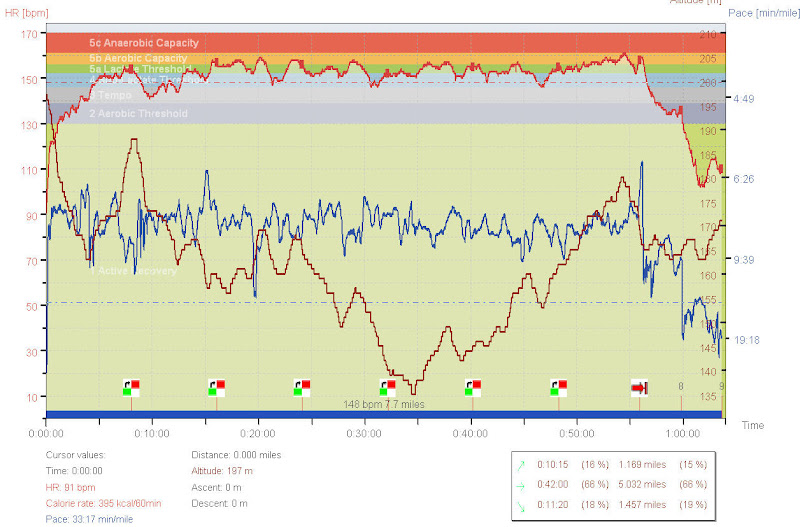
G3 graph
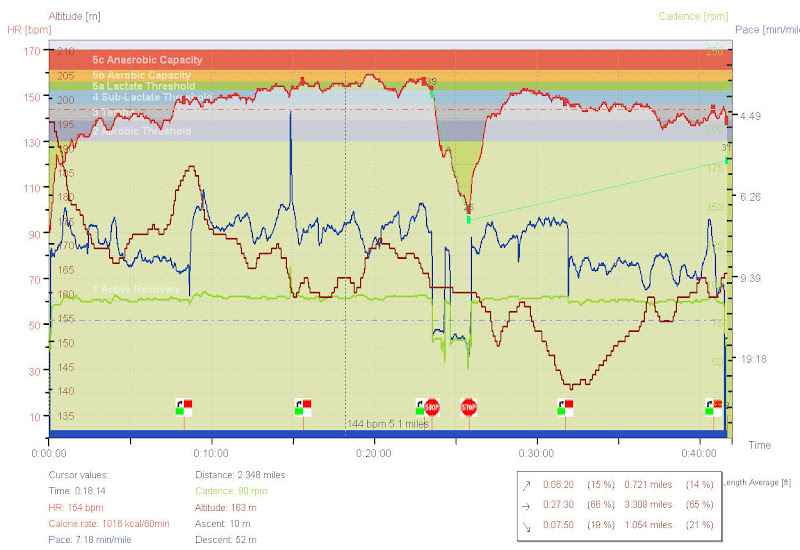
S3 graph
I used the G3 in another road race - South Mountain 10 mile road race - that I wrote about in my last post and the unit worked quite well even under fairly heavy tree cover. About 5 miles of this race is run up and down the road that is in the forrest. I did not notice any major drops in the signal coverage. You can see the picture below.
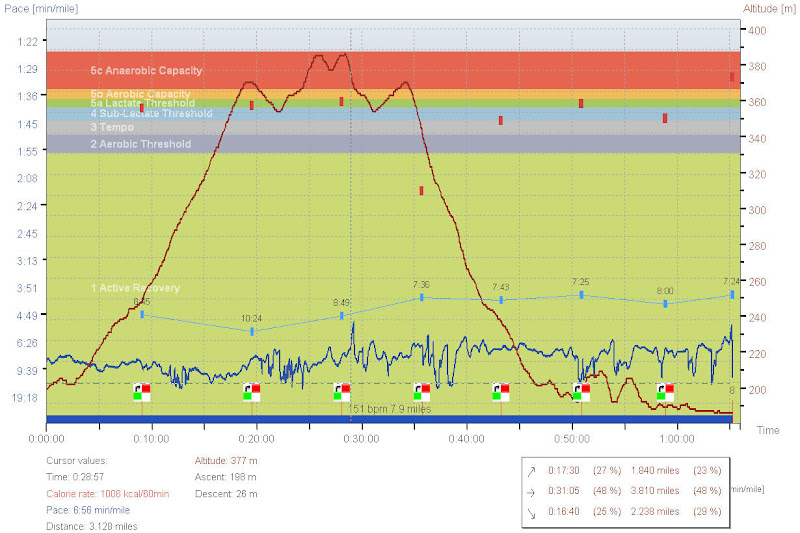
Besides running I use the G3 sensor with one of my bikes (one that does not have any gadgets like bike computer mounted on it) to get speed and distance info when I ride to the book store or just ride around the town. The G3 works very nice for the bike riding. It is very accurate in the distance reading and also in the speed reading. I'm thinking that I may use the unit next year for the triathlon racing, but I do not think I'll use it for swimming only for the bike and run legs. It will make the T2 easier as I'll not need to switch on the sensor or seek for another sensor that I had to do with the S625X and RS800sd.
Summary
If you are still puzzled whether you should get the G3 here is what it boils down to for me. The S3 and G3 sensors are very different sensors in how they work and in how they are used. If you do a lot of race track running or treadmill workouts you should stick with the S3 as you will have very little use for the G3. But if you do a lot of running outside, run trails or want to get onto the GPS train the upgrade to G3 can be a good step for you. As for what I do - I use both the S3 and G3 for my running (and biking) combining the two as I see fit. I use the S3 for all my interval and most of the tempo workouts. I use the G3 outside for either road races or long runs as well as for biking. It is nice to have the extra sensor with GPS technology I can use for biking without a need to mount the speed sensor on the bike.
Subscribe to:
Posts (Atom)


 Posts
Posts

