Showing posts with label T6c. Show all posts

May 1, 2010

Movescount.com - new on-line log for Suunto owners

Early in 2010 I have been invited by Suunto to take part in the testing of new service they have been working on and just few days ago unveiled to public. It is the Movescount.com service that lets owners of Suunto Tx line or X10 line log their activities. The service is free for all users and you can use it even without owning Suunto watch. But frankly there may be other optons that are better in such situation - like TrainingPeaks free account or other free services.


This new service is a really good news for Suunto owners on both PC and Mac as Suunto now released software to download data from the watch to their web service on both Windows and Mac OS X. That is probably the biggest news for users that are waiting for Mac version of Suunto Training Manager or Suunto Trek Manager.


Suunto really emphasizes the social aspect of the site and lets you link pictures from Flickr and videos from YouTube to your 'moves'. You can then share your moves page with friends on Facebook, MySpace, Google, mail, Twitter and other social networks.


If you own Suunto unit and want to migrate from their PC based software on-line this is the way to go. Especially if you are Mac user and were running the software in virtual machine. I like the fact that Suunto lets you load our old logs from STrM to the web to get started. Very nice - I wish Polar did this for the PPT5 (ideally both ways). In any case if you do not use on-line log, own Suunto and want new on-line log check it out.


Movescount.jpg

May 7, 2009

New look and feel for Polar RS800cx, T6c, T3c and Suunto foot pods

Both Polar and Suunto are adding new look and feel to the top of the line HR monitors this summer. Both companies announced new version of their watches.

Polar is introducing RS800cx Pro Team Edition package at the beginning of the cycling season. Its functionality is identical to the RS800cx and the package (at least in the US) will contain cycling speed sensor and cycling cadence sensor. You can add running S3 sensor and G3 GPS sensor to the watch as accessories. The watch has functionality just like the RS800cx only different case design. The package will contain the YSB IR stick and the Polar Pro Trainer 5 software for planning and evaluation of your training. I had chat with one of the dealers of Polar watches and they should have the watch in stock in the next few days. Polar announced that several pro cycling teams including Quick Step, Rabobank, and Caisse d'Eparge will use the Pro Team Edition in training and racing.

RS800CX_PTE_km_front_240x298.jpg
RS800CX_PTE_km_topleft_240x298.jpg

Suunto is also introducing a new look of two HRMs and foot pod. If you always wanted to have a watch that Matty Reed, Andy Potts, Javier Gomez, Jan Frodeno and other Suunto ambassadors use you will have your chance in late May or early June (depends on locality - US dealers should have watch in stock in mid May [updated following conversation with dealer in the US]). The T6c Red Arrow will be available for purchase to mark Suunto's collaboration with ITU and timing the Dextro Energy World Championship Series. The watch has just different color, otherwise is identical with the regular T6c that is currently offered as either Black (more like greenish black) or Fusion (combination of red and greenish black). I confirmed with Suunto dealer that the watch will be offered as standalone with no sensors. No specific packages have been announced yet, but that may come later (just like with T6c the triathlon package was announced few weeks after official release of the watch).

Suunto-T6-c-RA.jpg

In addition to the T6c Red Arrow Suunto will be offering new design of T3c - Black Arrow that will have identical functions to T3c and should be available in the same timeframe as the T6c Red Arrow. In addition to the new HRMs Suunto will also introduce red and yellow version of their foot pod in case you wanted to draw attention to your foot pod. The black version of the foot pod will continue to be offered. From materials that are available on Suunto site it does not seem there were any changes in the Foot pod or the HRMs other than new colors.

t3c_Black_Arrow_150x190_v3_m56577569830806139.jpg
FootPods.jpg

May 4, 2009

Suunto GPS pod end of relationship

Well yeah I had done one more run with the Suunto GPS pod and decided that it is not any good for pacing. During a run it would show constantly pace around 9:30 - 10:30 per mile while based on my perceived effort I was running more in 8:00 - 8:30 range. When I loaded data to my computer it was indeed the 8:00 - 8:30 range. The GPS pod is great for overall distance tracking and probably does well on mile long splits. But it is of no use in regular road running. I'll stick with the foot pod that provides much better results. So the GPS pod went back to Amazon and I expect refund in the next few days...

April 13, 2009

Suunto GPS pod second try

I have posted about my unpleasant experience with Suunto GPS pod on Suunto Discussions and asked for help from other users. It was recommended to me to give the GPS pod little longer to get better satellite lock and put the GPS pod on the same arm as the watch. I did all this prior to my long run this Sunday and the results were much better this time. As you can see from this picture.


Suunto_GPS_Pod_2.jpg

While the pacing info is not as good as from calibrated foot pod it is certainly much better than what I have seen in my first attempt. I have not lost connection between the watch and the GPS pod in the whole 2 hours of the exercise which is good. But what really bothered me was that the pace on the display of the watch was pretty much unusable. But I'm getting little ahead of myself. Let me start with this - I had a long run scheduled for Easter Sunday and I put it off until afternoon. I figured that there will be quite a bit of traffic on the roads I usually run so I took the running to Lehigh Valley Parkway. It is a nice park with great trails on rolling terrain. I thought it will be better for my knees and ankles than the roads. I wanted to test the GPS pod, but I also had second watch RS800cx with S3 foot pod to validate the pace. Well that was the plan anyways. When I was getting ready for the run the RS800cx would not link up with the foot pod (turned out to be a dead battery). Well great I thought, now I'll need to pace based on this GPS unit that I do not really know all that well. After about a mile of glancing at the pace it was clear to me that pacing with this GPS pod will not work. Instead I relied on the perceived exertion and my heart rate. Main reason for that was that the immediate pace in the park was jumping between 9 minute mile and 12 minute mile on my steady pace effort that I would estimate was more around 8:30 per mile. I was not that far off with my estimate - the pace was actually 8:20 which I figured out when I got home. The funny part is that while the pace jumps all over the place the distance gets recorded accurately so you can validate the pacing after the run. This is actually good exercise in listening to your body. I noticed that I often get too hung up on what the watch tells me and listen to my body less than I should.

After all the workout turned out to be a great success - not only did I do the work. I also validated that my perceived exertion is pretty much spot on - I had to run 60 minutes at 8:10 - 9:10 per mile which turned out to be about 8:20 based on the distance. Then the plan called for me to pick up the pace to 7:15 - 7:30 for 30 minutes - which turned out to be 7:33 and then I had 6 pickups to faster than 5k pace with 2 minute recoveries and 5 minutes cool down. After I got home I found out that I did quite well even without the watch telling me how fast I ran. And to some degree it was much better workout - I kept listening to my body and pushed through the rough spots during the session. You know, like when you feel the muscle fatigue that slows you down and you push through it and 100 meters later it feels ok again. I'm thinking about using the GPS pod for this type of workout again to see how my sense of pace improves over time.


What looked like a messed-up workout in the beginning turned out to be a great session. It was excellent practice in pacing without the feedback from the watch. "If life gives you lemons make lemonade," and as Ron White said on radio when I was heading over to the Lehigh Valley Parkway "make sure to find someone with vodka to have a party!".


April 9, 2009

Suunto GPS pod - first run - not so good

Few days ago I saw a good deal on Suunto GPS pod on Amazon and decided to test it out. It arrived last week on Friday, but I did not get to test it until today. Well I could have tested it during the Brandywine Duathlon, but I did not want to use new equipment for the first time in the race. Probably good I decided not to do it.

I actually did a pseudo test with the Suunto T6c + GPS pod and Polar RS800cx + G3 on the day I received the GPS pod. But it was not a real training test. What I did was to put both GPS units in my car and then measure the distance from my house to meeting place with few friends. The result was pretty good - the distance came to about 0.08 difference over 26 miles. Not bad. What I did not look at was the speed reported by the unit during the drive - I had to pay attention to where I was driving.

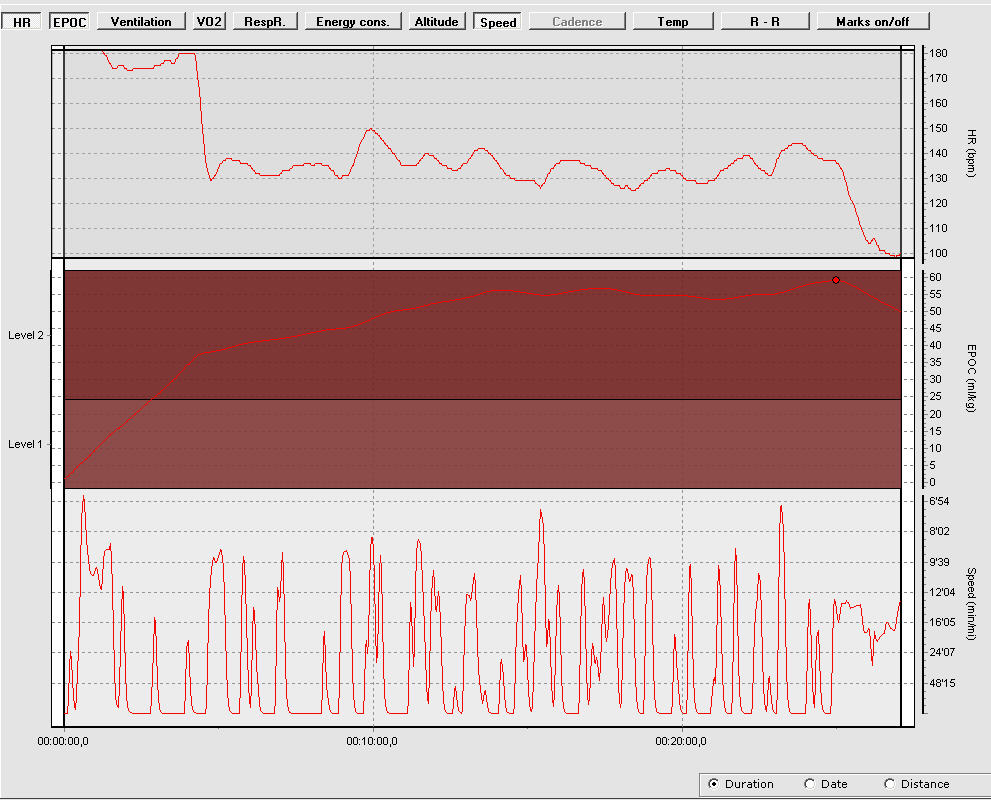
Today was the first real test of the GPS pod with T6c in an easy recovery run. Plan was to run at 8:30 - 9:40 pace for about 20-25 minutes. Easy enough to pay attention to what the GPS unit does and how well it reports the instantaneous pace. I started the GPS pod inside the house and set it by the window until it acquired the signal and then I walked out of the door. The GPS pod blinked like mad so I assumed it lost connection and I stopped for about 30 second and let it get satellite lock again. When the blinking slowed down I started moving again. The pace was all over the place and quite often I lost connection and the pace was showing -:--/min which is not very useful. On top of this the first 4 minutes the comfort belt rebelled and locked my HR at 180 beats which is quite impossible for me since my max is about 8 beats lower. After the run I looked at the exercise file and was not surprised to see this:


Suunto GPS pod.jpg

The top graph is HR, middle line is EPOC and the third line is the pace. It is really a sad picture. I looks like the GPS pod was either losing connection to the satellites or to the watch. I do not really know what was happening, but most of the time my pace was showing -:--/min which does not really tell you whether the satellite lock is gone or the connection to the watch.

If there is a GPS pod user out there that has working GPS pod I would want to know how you use it. E.g. how long do you want before you start moving? Are you wearing the pod on your arm? Same arm as watch or it does not matter? Any other hints will be appreciated. If I can not sort this out over the next few days I'll just pack the unit and send it back to Amazon for refund.

January 12, 2009

Polar RS800cx or Suunto T6c that is the question

How is that for controversial title? I have just recently received few question from people trying to decide between the two monitors. As you probably know I own both of them and do not plan to let one of them go any time soon. In fact I find both good at what they do, but if you have money just for one what should you do? Well you will need to decide for yourself, but this post will hopefully provide some information that make the decision easier.

I'll use the same format I used in the other comparison article in June of 2008 - Q: Garmin Forerunner 405 or Suunto T6c?. I made few changes to the T6c text reflecting my longer use of the watch. But most of it remains the same as 7 months ago. Note that I ultimately sold the Garmin Forerunner 405 on eBay after I got tired of it. I'm sticking with the RS800cx and T6c for now.


Training planning

Polar RS800cx - it will be of little surprise to readers of this blog, that I like the abilities to program variety of guided workouts in this watch. It offers so many options to structure workout that I have yet to find a workout I can not program in it. You name it - ladder intervals, sessions with various interval length, phases focusing in cadence, pace or HR. You can do it all. Do you need to workout for specific time or until your HR raises to specific HR, etc. So in training planning I really prefer the flexibility and functionality you get in RS800cx. You can define workout in the watch, but I prefer to use the Polar Pro Trainer 5 software to plan my training sessions.

Suunto T6c - has some planning capability in the software, but the guided workouts are to be defined directly in the watch. You can define warm-up duration, countdown duration (in case you want to do warmup, but not include it in the total exercise time), then there are two time intervals or you can use distance intervals (again only two). You can define how many times to repeat the intervals and that is it. I find this fairly good for less structured training sessions. So I use the T6c on simpler workouts - like tempo runs or recovery runs that are easily fit into the format of warm-up and two interval timers. (In June I wrote that I felt the RS800 was more robotic way to do the workouts - I do not feel that way these days. Perhaps I was on the edge of overtraining and needed to step back. The switch to T6c certainly helped that. These days I train with both and as I wrote above the RS800cx is for more structured sessions and T6c for sessions that have little less structure). The T6c is very similar in training planning abilities to S625X from Polar in terms of interval workouts.


Training

Polar RS800cx - what I like in RS800cx is the ability to define up to 3 pairs of shoes with different calibration factors. So you do not need to mess with the CF before each run if you decide to wear different shoes or just switch from road to treadmill. The actual execution of the training session is very well supported by the watch. It has very clear and loud beep when switching from one planned phase to another. Also the limits alarm beeps loud enough to hear it if you exercise with headphones. The watch provides information about many parameters of your session from overall perspective or individual laps. After each lap watch briefly displays the summary for the lap and if if is changing from one phase to another it shows the new phase title. This is very useful when you have multiple phases and in the middle of the exercise forget what is next - the watch will remind you. I also like the little repeat calculator in the right bottom part of the screen that shows you how many repeats of the phase or phases are remaining. It is very useful especially in case of interval training when you may miscount - yeah it happens to me all the time. Another great thing on the watch is the display. It shows bunch of data which can be overwhelming at times, so I tend to stick to 2-3 displays that I configured to provide the key information I need (jut FYI the watch has 6 displays you can configure yourself, one multi-sport display which is discussed later in this text and one display for count-down of the current phase). The count-down display shows the counter of the current phase with time remaining and information about the limits - e.g. HR, cadence, etc. Other stuff that you may like in this watch is the recording of your location if you use the G3 GPS sensor, recording of cadence both in cycling and running. There is more about this unit in the three detailed articles I wrote last year after I had the watch for few weeks. I will not go back to that discussion here.

There is doubt that this watch provides the most functionality out of any HRMs I owned so far. The only missing piece is the automatic switch between the sensors - like from bike to run. But the watch manages that OK. You can stop the exercise, switch to the other sensors and start a new session. The watch will prompt you if you want to combine exercises and if you do so it shows a new display for multi-sport workout. The display shows overall time, distance and calories burned in the combined session. You can combine multiple sessions into one and then review them later in the software.

Suunto T6c - works like a charm for running and biking (and with memory belt also OK for swimming). The watch is able to automatically switch between sensors (pods) if you use multiple in one session - bike pod, foot pod, GPS pod. Like in the triathlon race. The comfort HR belt is very nice - I find it even more ehm comfortable than the Polar WearLink+ and it works very well once you figure out which part to moisten. The watch has configurable screens - 2 screens 3 lines each and the last line can show multiple items that you can switch between. Other that that the watch displays the EPOC and TE on the fly, but I find these values less accurate than what you get later on the computer.

The really cool feature of this watch is the automatic switch between the sensors. I did a brick session and it recorded my bike speed / distance (as 18mph), then I did a lap for transition and headed out of the house for a short run. Before I hit the street it was already switched to my foot pod and was showing my pace 18:30/mi as I walked and soon 7:45/mi as I started running. It is pretty cool to see this working after struggling with this with Polar, previous Suunto and Garmin. This may not be as important for single sport athletes, but quite nice for triathletes. Especially if you want to have one less thing to care about in transition. That is also one reason T6c will remain in my collection. I plan on racing with it again this season.


Evaluation of training

I guess this sentence from original article summarizes it well: "Well compared to Polar software both Garmin and Suunto have a long way to go."

Polar RS800cx - Polar Pro Trainer 5 offers certainly the software with most bells and whistles for analysis of single workout or reporting over a defined period of time. I love the ability not only to define own sports, but for each to set the speed/pace units that I want to see in the graphs, different HR zones for each sport and the ability to define my own reports and customize how they look. You can easily take any set of HR zones and synchronize them to your watch in case you wanted to switch between them for cycling or running session. The calendar view and summary for the week is also quite useful and shows you actual vs planned - number of exercises, training time, distance and actual burned calories.

I also like the way Polar stores the log files in individual text file. I can modify the logs if I need to correct data from the session. Like this past weekend when I had an occurrence of CS600 not connected well with my HR belt. After the session I had all HR data in RS800cx log and all the power, cadence, speed data in the CS600 (but no HR). I simply took the logs opened them in text editor did one large copy/paste and saved the log. Everything was saved and I could do the analysis I needed to do with HR, power data. While I had few cases when CS600 did not capture my HR data I never had issue with RS800cx. If you are interested in R-R data analysis the RS800cx can capture the data and you can later analyze them in the Polar software (which has very limited analysis functions) or load them to other R-R analysis tools like FirstBeat Athlete or Kubios HRV.

Suunto T6c - the biggest difference between T6c and other HRMs is the analysis of your workouts to provide EPOC and TE. The standard STrM software does the basic analysis and shows you the data recorded by the watch - R-R data, HR, speed / distance and all the parameters the software calculates based on the R-R. I use also the FirstBeat Athlete software mostly to help me look at my EPOC load during the week and month. The STrM is not as flexible as PPT5 and while it allows definition of multiple sports it supports only one set of HR zones. I find the analysis capabilities of the software little limited compared to PPT5. The only exception is the TE and EPOC that Polar does not provide in their software. But if you use the FirstBeat Athlete you can get the EPOC and TE post workout if you load the R-R files to the software. I found the fine tuning of the parameters for the accurate EPOC/TE calculation somewhat complicated when I first got the watch. But that is no longer the case since Suunto published the manual from Eddie Fletcher that describes how to best setup the watch. Key is to determine your activity class based on your weekly training load and your VO2max either via lab test or based on field test or race result. The manual provides great examples and makes setting-up the watch much easier than before it was published.


Daily use as a watch

Polar RS800cx - I wore the RS800sd on daily basis for over a year and the RS800cx is the same 'format'. It fits well under shirt and can be used as daily watch. It is just a tiny bit smaller than the T6c, but it is hardly noticeable. The alarm of this watch works fine and can be snoozed for 10 minutes if you want to get more sleep.

Suunto T6c - It is a watch that you can use daily. It fits under the shirt and goes with pretty much any outfit (especially the black version that is not as flashy as the Fusion). I pretty much alternate between T6c and RS800cx as my daily watch. I do not mind wearing either one of them. You may prefer Suunto if you need multiple alarms to get out of the bed - T6c has 3 of them, but does not offer snooze.


Cost

Note that this section reflects the situation as of January 2008 and that I looked at prices on US market. The prices are likely to change over time so do your research, check sites that sell Polar and Suunto watches. I also strongly recommend to only buy from certified distributors and resellers of Polar and Suunto to prevent any warranty repair issues. Both Suunto and Polar confirmed in telephone that they honor warranty from Amazon.com where I made most of my purchases in the past few months of HRM shopping.

Polar RS800cx - the watch alone is now about 400 USD + tax. You can also buy a package with the watch and either S3 sensor for running (470 USD), multisport package with G3 sensor for 470 USD or bike package with bike speed sensor for 430 USD. The additional sensors go for 140 USD for the S3 foot pod, 130 USD for the G3 GPS sensor, 55 USD for cadence WIND sensor and 55 USD for bike speed sensor WIND. Do your math before you buy as certain combinations of packages and additional sensors could be less expensive than others.

Suunto T6c - The watch sells for 335 USD for Black version and 350 USD for Fusion version. The foot pod for 80 USD, bike pod for 50 USD, the road bike pod for 57 USD and lastly the GPS pod for about 150 USD. Suunto also offers various packs with T6c - Triathlon pack with all you need for triathlon including memory belt for 660 USD, Running pack with T6c and foot pod for 470 USD and Multisport pack with GPS sensor (does not capture location) for 530 USD.


Conclusion?

Well you will need to make one for yourself. If you can go look at both models in the store or at the race expo and test them out before you purchase. They are both very good HRMs and will help you structure your training. As for me I'm going to keep both of them on my wrist as I train. One at a time to be exact. I will cotinue to use the T6c for less structured sessions and RS800cx for sessions that are more complex. I will continue to run road races with RS800cx and do triathlons with T6c. Let me know if this helped a bit in your decision making.


Update (13/1/09): In case you want to read more about the RS800cx you may like to review few earlier articles on this blog:

RS800CX - more detailed review of the functions I.
RS800CX - more detailed review of the functions II.
Analysis of training data (part 3 of RS800CX reviews)

There are also few articles about Suunto T6c that I published earlier.

December 31, 2008

Protect your investment

So you have got yourself the gadget you wanted so much. Now you are starting to use it and discover its capabilities. You exercise with it and sometimes even wear it the whole day. That's all good and well, but did you happen to think about protecting your investment. It is no fun to find dings or scratches on the watch face after just few weeks or months of use. I actually experienced that first hand with the Suunto T6c Fusion I bought earlier this year. The watch suffered two dings and few small scratches on the face, even with Suunto stating that the watch has mineral glass that should be fairly resilient to abuse.

Most of the newly designed HRMs leave the watch face unprotected. Older models like Polar S625X, S725X, Suuto T6 had raised edge that protected the watch from accidental hits. The new watches like Polar RS400, Polar RS800 / RS800cx or Suunto T6c do not have this protection. While I have only the best experience with durability of the RS800 model I did not want to take any risk with my new gadgets. Looking through the discussion forums I came across ZAGG Invisible Shield protection foil. Apparently this is thin plastic foil that you install on the face of the watch and it will protect it from accidental damage. It does not protect any other part of the watch, but in my experience the glass is what gets damaged most often. Few weeks ago I installed foil protection on my new Suunto T6c and about a week later I got another foil to protect my Polar RS800cx.


Invisible Shield box

The installation procedure is very simple, but you will want to plan about 15-20 minutes for it. You will also want to do the installation in the comfort of your home or office. You will also need to have very clean hands when installing the foil - it may be easy to get your fingerprints all over the foil or watch if you do not clean them up front. You will also need to clean the watch from any sweat or smudges before you begin. Then follow the instructions and apply the provided spray on your hands. Spray the foil and put it in place. Then slowly and diligently press out the bubbles out of the foil and make sure it fits well. If you do not get it the first time just take it off and start over. I had to repeat installation on the RS800cx three times before I got it right. With the angled face it is somewhat more difficult to install the RS800cx foil that the T6c foil, but ultimately they both get installed in about 10 minutes. After you are happy with the install, dry off the remaining spray from the watch and set it aside for few hours. ZAGG recommends 12 hours, but I used mine in workout the next morning after the install - so about 8-9 hours later with no issues. Below are two pictures - first one of RS800cx with the ZAGG foil and the second Suunto T6c with the foil. Note that the pictures are extreme close-ups of the watch. In reality you can not see the edges of foil on any of the watches.


T6c with Invisible Shield


RS800cx with Invisible Shield


The foil works fine during the day. You can not really see that the watch has a protective foil on its face unless you are looking for it. In low light conditions the Suunto T6c gets little dim as the back light seems to be weaker than to one on RS800cx. I used the watch during ride to the shop in the evening and it was little hard to see the time when I switched on the back light (note I did not even try this while running when the watch actually flickers). Otherwise I did not determine any issues with the protection foil. I have exercised with both HRMs inside, outside and wore each one of them for few days as a regular watch. I highly recommend the 10-20 bucks investment to protect the watch that is most likely 20-30 times as expensive to replace. ZAGG also makes protection foil for cell phones, MP3 players and computers. But I have not tried one yet. If I were to buy a new iPod today I would definitely put Invisible Shield on it to protect it. It would prevent bunch of scratches that I have on my iPods after the abuse they get through during the almost daily use.

December 11, 2008

Should you update T6 to T6c firmware?

In recent weeks I have been writing a lot about Polar HRMs. Today we will change tune a little. Some of you may remember that I have pretty large collection of HRMs including few from Suunto. This post is about the upgrade of T6 to T6c firmware.

Few months ago Suunto Finland started offering update of firmware for the T6 owners. It is offered as for a fee update that costs either 79 EUR for the firmware update or 99 EUR if you also want to get the comfort belt along with the update. That os very nice price considering the Comfort belt sells for around 79 bucks at the Suunto dealers.

The upgrade has been offered to European users since September or so while US based T6 users had option to either wait until Suunto builds the capability in the US or take the plunge and buy a new T6c (and hope to sell T6 on eBay for more than few bucks. About a month ago I sent question to Suunto inquiring about the possibility to upgrade. The help desk suggested that the service is not yet ready in the US, but that I can send my watch to Finland. It was a no brainer for me - the T6 functionality is nowhere near the T6c so the next day my T6 was packed, properly insured and sent off to Suunto service center in Finland. I checked tracking info few times during the following week to make sure the watch made it to Service center. Then I forgot all about it and carried with my training using the Polar RS800CX.

On Friday after Thanksgiving Suunto called me to get the credit card number and make sure I wanted the comfort belt as well. They took the CC number over the phone, ran it and then told me that the watch should arrive some time during the following week. It actually took only few days before DHL showed on my doorsteps and handed me envelope with upgraded T6. Suunto sent along instructions for pairing the watch with pods and first of the two books that they ship with T6c. I started setting-up the watch - as you could expect the memory was completely wiped clean and I had to set it up like a brand new watch. Which is really just a matter of few minutes if you know all your parameters. The key i to set User parameters like birth year and sex which should be no problem for most; height and weight can be easily measured; activity class is easy to deduct for your individual level of training and performance. Max HR can be tricky, but Suunto gives you initial formula that you can fine tune based on lab result or observed max in maximum intensity workouts and only METs need to be determined based on race performance, 12 minute test or lab testing. It is few more parameters to setup as the T6c not only measures the HR, R-R and other data. It also calculates EPOC and TE directly in the watch. Once I set the watch up (including adjustments to units, time and recording parameters) I paired it with the foot pod and memory belt. Then the watch was ready for the recovery run I did later in the day. As you could expect it performs exactly the same as T6c. The only difference between the two is visual.

Following are few pictures of the black T6c and the upgraded T6 in case you are considering the upgrade. On first one the T6c on the left and upgraded T6 on the right side. (note that the extra icons on the display are due to different parameters set on each watch - the T6 has alarm set and T6c has HR limits warning on. If I set them both the same way they would show the same icons in the same places).

Black T6c left, T6 upgraded to T6c right

Next photo shows the T6c in close up. Notice the three icons on the left side of the bezel - they indicate the three possible displays - time, display 1 and display 2. There is no baro/alti position and function on this watch (compared to T6).

Black T6c


On this picture you can see close up of T6 in time mode. Notice that the watch has four icons on the left side of the bezel - only three positions are actually used in T6c firmware. There is no alti/baro function any longer after the upgrade.

T6 upgraded to T6c: Time

Here is T6 in Display 1 - searching for HR belt and pods. Note that the middle icon is selected (the one with the heart).

T6 upgraded to T6c: Display 1

This is the same picture only on Display 2 - see the little dot on the left side of the display indicating Display 2 is selected.

T6 upgraded to T6c: Display 2

You may be asking if you should update your watch to T6c firmware. I hope the pictures above and following description will help you make that call.

If you want the T6c and are willing to pay for the update this may be the cheaper way than buying the T6c and selling the T6 on eBay. Although Amazon had some great deals on T6c on Black Friday when the watch was to be had for 213 USD shipped, but now they are back to 305 USD. You may not like the update especially if you used the baro and alti function in T6 a lot. You will lose it with this update. Also if you used the numbers on the right side of the display to understand the settings of the watch you may miss that as well. In the T6c the numbers on the right side of the display indicate the TE as you go through the workout. So those are the negatives for long time users of T6 (not really negatives for me). If you do not use the alti/baro or can live without it I would recommend the upgrade. You will gain quite a lot through the update and will have a brand new watch with following functions:


  • ability to use comfort belt,
  • ability to pair second HR belt with the watch like memory belt,
  • ability to switch between the sensors without any user interaction,
  • better structure of the menu - you can actually find things in this one, customizable displays.


Overall I like the updated T6 much better that the original one one. But I never really used the baro and alti standalone functions (note that the altitude is still shown on the time display and captured during the workout).

So what do I you need to do to get this done. Well as a first step get in touch with Suunto Help Desk and ask them for address and paperwork needed to get the upgrade done. I had to prepare a simple letter describing what I wanted to be done and fill-out form for import duties and taxes declaring that the watch is being sent to Finland for repair and will come back o the US. Then pack your watch carefully and send it off. I suggest not to include your credit card number in the package - you never know where that package may end up. And you may also want to insure the package just in case the watch gets lost - I recommend to insure it for 309 USD so you can get a new T6c from Amazon if your trusted T6 does not make it to Finland. Then patiently wait for Suunto to call you for CC number and in few days after that you will have your own new T6c in package that you like. The whole process took less than 14 days for me and I have shipped the watch on Thursday night and got it back on Wednesday morning in less than 2 weeks.

I know for the price of the shipping and upgrade you can get a new T6c and sell your T6 on eBay. That may be the other option if you want a brand new watch with full 2 years warranty. It is entirely your call.


November 19, 2008

And now something completely different... Suunto T6 firmware upgrade

As the title indicates I will not talk about Polar in this post. I actually have news about Suunto this time. As you may remember I kept the Suunto T6 as my backup watch. Last night I sent support request to Suunto inquiring about availability of the firmware update from T6 to T6c. This morning I received a response suggesting that while the upgrade is not available in the US I can send my watch to Finland to get the update done. So this morning I filled-out the required paperwork, packed the watch and sent it off to Finland. I'll report here when I receive it back.

If you are considering this step note that the procedure is relatively expensive - shipping with tracking number via FedEx is about 60 bucks (this is the most economical way to ship with tracking and delivery in few days) and the upgrade itself is 79 EUR for the firmware upgrade or 99 EUR if you also want to get a Comfort Belt with the upgraded watch.

You may be asking why I do this. Here is the reason - this past season I raced with Suunto T6c and like the functionality of the watch for racing. I was little disappointed with the durability of the T6c watch though. When I compared it to T6 the watch face was not as durable as the previous model. I also liked the color, design and feel of the T6 on my hand better than the T6c. The T6c ended-up on eBay and I kept the T6 as a backup watch. T6 functionality is little flaky compared with the T6c firmware and I never really had success in using it in race to record the whole race without a glitch. So the ideal watch out of the two is the hybrid - T6 model with the T6c firmware. I may stick with it for races. But I'm sure I'll keep training with Polar as it has more functionality to help me structure the training sessions. I guess this will be the big decision for next season when we get close to the first race. Plenty of time until then.

August 8, 2008

EMS offering Suunto T6c for 319 USD with free ship and 25 USD card

If you have been putting off the T6c purchase, now may be the time to take the plunge - EMS offers the T6c at very reasonable 319 USD with free shipping and 25 USD Gear Bucks Card. That is pretty good deal if you ask me. Just remember to use the Gear Bucks card before end of September.

June 29, 2008

Q: Garmin Forerunner 405 or Suunto T6c?

Earlier last week friend of mine asked me the question in the title. I composed pretty lengthy response to his question to help him decide. It summarizes my experience with both HRMs. After reading it again I realized that there may be other people with similar question. Perhaps this one user summary will help you decide what to do. Please consider that I'm a triathlete and may have a different requirements from my HRM than pure runners (main being water resistance and second the support for multiple speed/distance sensors for tri racing). So here you go:

So you are on a quest as well? I just went through a number of HRMs and plan to sell some on eBay in the next few weeks. As for the 405 vs. T6c I think I can give you my take as I own and use both at the moment. It really depends on what you intend to do with the HRMs so I'll look at them from few angles.


Training planning


Garmin Forerunner 405 - Garmin has some planning functions (limited compared to RS800 from Polar), but you can structure the workout as you need which is quite nice especially for complex intervals training if you need to do it on treadmill. The result of planning is a guided workout in the watch that you can assign to particular day and the watch will let you follow it when you are ready to train.


Suunto T6c - has some planning capability in the software, but the guided workouts are to be defined directly in the watch. You can define warm-up duration, countdown duration (in case you want to do warmup, but not include it in the total exercise time), then there are two time intervals or you can use distance intervals (again only two). I find this fairly good for training and less robot like training - at times with the RS800 I felt like a robot executing a workout. The T6c gives you little more flexibility to adjust the workout as you feel just before you start. Very similar to S625X from Polar in terms of interval workouts.


Training


Garmin Forerunner 405 - the Garmin watch is great for running, OK for cycling and totally unusable for swimming. During running it connects to GPS very quickly and keep the connection just fine (despite the smaller size compared to 305). You can also use the foot pod (additional 99 USD) to keep track of your cadence during the runs. If the watch loses GPS connection it switches to the foot pod. You will need the foot pod on the treadmill if you use it. For biking you can get the bike pod, but I do not know much about it as I do not use it. The HR belt is fairly comfy, but it is a big rubber band like the very old Polar watches, but it is more comfortable. If you do not use HR belt Garmin approximates the calories expenditure, but the algorithm is weird - it told me my 56 miles bike ride burned 4500 calories. Yeah right. One nice thing is the GPS navigation - you can actually build track in the Google Earth or on the web like mapmyrun.com and transfer it to the watch as a course and then execute it. You can also take advantage of navigation if you do out and back run. The watch will guide you back to your starting position (through all the places you ran before) - basically backtracking home.


Suunto T6c - works like a charm for any sport and automatically switches between sensors (pods) if you use multiple - bike pod, foot pod, GPS pod. I use the watch with Memory Belt during swim and with comfort belt for running and biking. The comfort HR belt is very nice - even better than the Polar WearLink (the new one) and works very well once you figure out which part to moisten. The watch has configurable screens - 2 screens 3 lines each and the last line can show multiple items that you can switch between. I like it more than the Polar approach or Garmin approach (very similar - 3 items on each display and you switch between displays). What is really cool the watch switches between the sensors automatically. I did a brick today and it recorded my bike speed / distance (as 18mph), then I did a lap for transition and headed out of the house for a short run. Before I hit the street it was already switched to my foot pod and was showing my pace 18:30/mi and soon 7:45/mi. It is pretty cool to see this working after struggling with this with Polar, previous Suunto and Garmin. This may not be as important for one sport athletes, but quite nice for tri-geeks...


Evaluation of training


Well compared to Polar software both Garmin and Suunto have a long way to go.


Garmin Forerunner 405 - The evaluation software is pretty basic, but it has a nice feature of loading the GPS data and showing you the map of your run. It is nice, but to some degree it is a gimmick. It wears out pretty quickly. I mean how much do you need to know about where you ran around your house. It is nice though for all the business trips. Other than that the data is fairly basic and the data has the usual issues of the GPS sensor - the pacing data are fairly useless (quite an oscillation due to fluctuating GPS signal and the fact that the resolution is about 3-5 meters which does not really work well with immediate pace), I have very little confidence in calories burned. The HR data is very basic - no beat-to-beat info like in Polar RS800 or T6/T6c. Nice thing is that you can set your pace zones and HR zones and see how you did during the exercise. Overall I use the Training Center very little - mostly to load the courses or review the high level data.


Suunto T6c - the biggest difference between T6/T6c and other HRMs is the EPOC and TE. The standard STrM software does the basic analysis and shows you the
data recorded by the watch - R-R data, HR, speed / distance and all the parameters the software calculates based on the R-R. I use also the FirstBeat Athlete software mostly to help me look at my EPOC load during the week and month. I do get variety of the TE and EPOC based on how hard my training was, but it took me a while to fine tune the parameters. There are very good guides in the Wriststop Trainers group on Yahoo!. I fine tuned my parameters after few runs and Cooper running test. Since then my EPOC and TE makes a lot of sense and reflects how I felt during the training. I do review the detail mostly HR, R-R, EPOC and TE in both STrM and FirstBeat. FirstBeat seems to be more precise than the STrM especially for training of TE 1-2. For TE 3-4 the results are very similar. The T6c now shows the EPOC and TE during the workout and that is good, but not ultimately how I regulate my workout. I have my own training plan that I follow and use the EPOC / TE for overall evaluation at the end of the week to make sure my easy week is easy and build week is at least rated as moderate in the FirstBeat.


Daily use as a watch


Garmin Forerunner 405 - the watch can be used as every day watch, but it may be too large for people with small hands and people that need to wear shirts. It does not fit easily under the sleeve as it is quite bulky (the GPS needs to go somewhere). You will need to charge the watch every 3-4 days to keep it going. It has about 2 weeks of life with no GPS use and about 8 hours of continuous use of GPS. It is quite nice and the design gets you some attention. I heard people commenting on the watch and expressing interest to get one as well (mostly people doing some exercise).


Suunto T6c - It is a watch that you can use daily. It fits under the shirt and goes with any outfit. Since I got this watch it is my only watch that I use every day. I take it off only when I shower.


Cost


Note that this section reflects the situation as of June 2008. The prices are likely to change over time so do your research, check sites that sell Suunto watches and are certified by Suunto (you may not want to take chances with buying new watch from eBay and losing the warranty - I believe Suunto does not honor the eBay purchases. I actually called their support line before I purchased from Amazon to make sure they will honor the warranty).

Garmin Forerunner 405 - the watch is now about 350 USD + tax, foot pod about 99 USD and the bike pod 60 bucks


Suunto T6c - I got the watch for 320 USD (I guess I was lucky as the prices are back up to 429 USD on Amazon), foot pod for 90 USD and bike pod for 50 USD


So what it means for me - well I will continue to use both. I like the Garmin even with its shortcomings for recording speed/distance and position during running and biking. And the T6c is my primary HRM. Sometimes I run and bike with both, but most of the time you will find me with the T6c.


I do not have a simple answer T6c or 405, but you may be able to decide by reviewing my perceptions above and evaluatin what is important for you. I feel like I could live without the 405, but like to keep it as a second HRM.


If you want to research this topic even more there is a discussion thread on Suunto Discussions where I shared some more thoughts about the Garmin 405 vs. Suunto T6c more from a runner's point of view.