Just came across this great overview of PPT5. It highlights the key benefits of the software and shows the granularity to which you can plan training and analyze workout data. Polar is still the best for this from what I have seen and used.
Showing posts with label Training tips. Show all posts
Showing posts with label Training tips. Show all posts
May 7, 2009


October 21, 2008
Analysis of training data (part 3 of RS800CX reviews)
This is a third article focused on how I use the HRM in training. If you missed the previous articles you can find them on this site. Follow the links below:
RS800CX - more detailed review of the functions I.
RS800CX - more detailed review of the functions II.
I selected a different title for this post than for the previous two as it is not much about the RS800CX watch, but more about 3rd party software I use for analysis of data that I gather during training. I'll also make references to CS600 with power sensor as that is what I use on my bike and the software analysis tools leverage the power data. And lastly instead of discussing the programs one by one without much context I'll talk about the entire process from the workout planning to the analysis of results of individual sessions as well as weekly, monthly and season.
Before we get down to the details let me talk a little about the software I use for my training. First up is the TrainingPeaks.com - website designed for endurance athletes that fully follows the Triathlete's Training Bible from Joe Friel (and also Cyclist's Training Bible from the same author). The Training Bible outlines a very structured approach to planning an entire racing season and periodizing the training for peaking at the key events. The TrainingPeaks.com site helps with planning the season, setting the goals and monitoring the progress.
Second software I use is the WKO+ from the same group that developed TrainingPeaks.com. The WKO+ used to be called CyclingPeaks and was geared towards cyclists, but in the recent few updates the software introduced features that help runners assess their workouts. As you can expect there is integration between the WKO+ and TrainingPeaks.com.
The third software package I started to use recently is the FirstBeat Athlete. The FB Athlete provides wealth of features including the Training Coach, but I use only parts of it that I found useful. I do not use the Training Coach in the FB Athlete as I prefer to rely on real coach rather than have software determine my plans for me. But there are folks that rely on software for fitness level training and are quite happy with the results. Now with the major packages introduced let's look at how I use them through out the season.
Season planning - the big picture
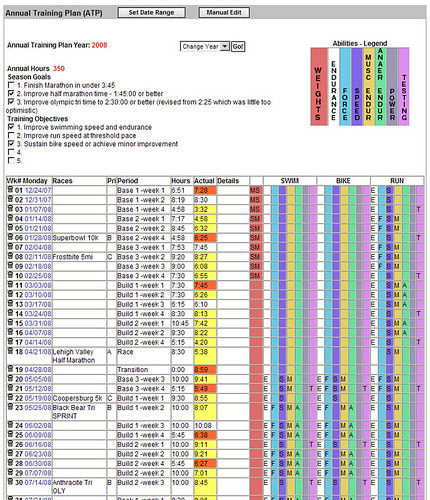
I'm not going to describe the whole Training Bible philosophy here, you can read it in the Training Bible books (note that new version of The Triathlete's Training Bible will be released soon, I suggest you to wait for it as Joe Friel made significant revisions to the book as he discusses on his blog. In short the season planning is done after your last priority A race in the previous season. The planning starts with setting the preferences for the next season like annual training hours, time frame, your personal data, then you are guided through setting the season goals and assessing your limiters. In the next step you plan individual races for the season and prioritize them as A, B or C events. Essentially the A events are the ones you will taper for and B, C events are either tune up races or testing races. It does not mean that you do not push hard in B or C race, it just helps you structure your plan. Once you set the races and their priorities the site will compute your annual training plan. The training plan basically spreads the annual training hours through out the season and assigns each week to a specific training phase (transition, preparation, base, build, peak, race). There is logic in the software that assigns the hours to each week according to the phase that you will be in during that week. You can adjust the annual training plan any time later or even re-calculate it during the season in case you need to re-assess due to unforeseen circumstances. The next step is to plan your week. The picture below shows the annual training plan that already has workouts logged against it (new one would be empty). Also note that the training plan has section for strength training, swim, bike and run and for each week you can determine which abilities you will work on (see the colorful bars at the top of the picture). The annual plan suggests the sports you need to work on based on the races you planned, but you can modify the plan as you see fit. There is much more that you can do with the plan, but as an introduction this is hopefully sufficient.
Planning training week
When I started training few years ago I used to put plan for the entire build-up to the A-race into the TrainingPeaks.com and it was typically a plan I derived from a book or combination of few canned plans. Few months ago I hired a coach and no longer do the detailed weekly planning. I receive them and execute them to the best of my ability. Typically my coach plans first few days of my week on Sunday the previous week and the rest in early part of the training week. There is a general schedule we agreed in the beginning that is pretty much dictated by my work and family commitments. If I have any changes to the general schedule or my status (like injury or sickness) I advise my coach via e-mail or through the TrainingPeaks.com site. The next picture shows the completed week (actually this is my last week) with individual workouts and instructions from my coach. 
The second picture shows one of the planned workouts. Besides having the workouts on-line the site also sends you e-mail (if you chose to) with the workouts for next two days. If you need to you can move workouts around (unless they are from your coach - then you need to ask for them to move it).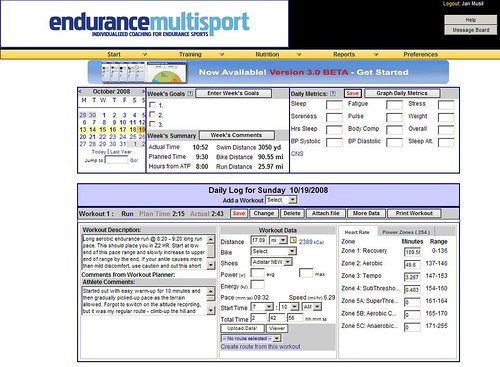
For more complex workouts or for workouts in which I want the HRM to monitor key parameters of the workout I create planned workout in PPT5. In the workout I set the limits as I need them in the specific workout - for cycling sessions it is generally HR, cadence or power (I use CS600 with power), for run sessions I use mostly HR limits. I do not plan swim sessions in the PPT5 as the S625X does not support guided workouts the same way RS800CX and CS600 do. Plus when I swim I just have a printout of the workout in a ziploc bag on the pool side and follow it - not a big need to have the watch beep at me. Example of workout in the PPT5 is below.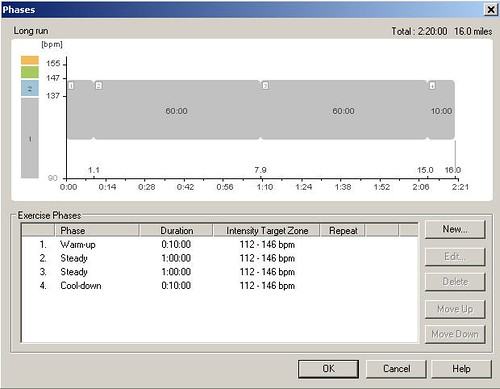
The planned workout is then transferred to the HRM and I execute the training session according to the guidance. In case of simple workouts I use the Free workout type from the watch which does not have any guidance and is ideal for self-guided workout.
Workout analysis
After the workout is complete I load it to the PPT5 and look at the key parameters of the workout. The PPT5 has been discussed in the previous articles so I'll not go into too much detail here. Typically the assessment consists of reviewing the pacing information, looking at whether I reached the workout goals and assessing where I had troubles. This may be a very short assessment for some workouts like easy recovery workout where I would only check if I went too hard at any point. For specific workouts like long bike, brick or long run I would look at the splits, power output (in cycling), pace, cadence and other variables on the chart shown below.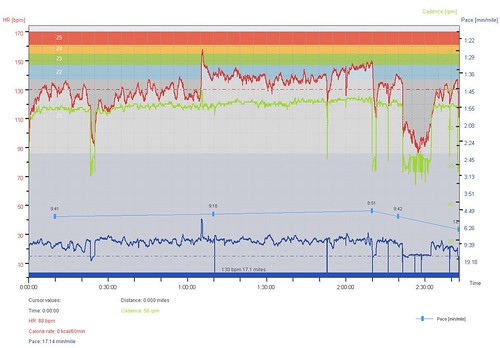
The PPT5 allows to change the selection (the thick blue bar under the graph) and select specific segment or segments (even non-continuus) and then review parameters for the selection. I may also add notes, laps and correct the errors in the recording (which does not happen often).
Once I'm done with the workout editing in the PPT5 I take the hrm file and load it to the WKO+. In the WKO+ I look at the overall training stress score (TSS) and intensity factor (IF). Note that the TSS and IF get only calculated for cycling workouts with power and running workouts with pace/distance data.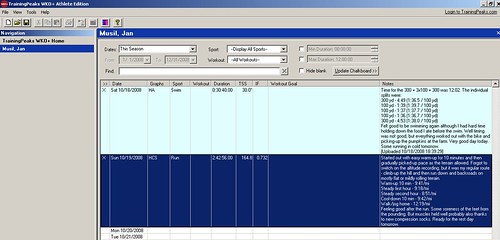
Then I look at the individual parameters of the workout and review the power zones (for cycling) and HR zones (for running) on the screen shown below. I also tend to look at Mean Maximal Pace for runs and Mean Maximal Power for cycling sessions. The software is very flexible and lets you define additional graphs to review other parameters of the session.
For majority of sessions I also look at the detailed graph and look at other parameters - like HR / power or HR / pace decoupling that is quite good way to assess your base in long steady state efforts. I may analyze cycling sessions to see how many candles I have burned - this is quite useful for race analysis to understand why you blew-up later on bike or did not have good run in triathlon race. There is just a lot you can derive from WKO+, but the software requires you to do good amount of reading of the manuals and I also recommend you to read Joe Friel's blog. Following picture shows the detailed graph of the session.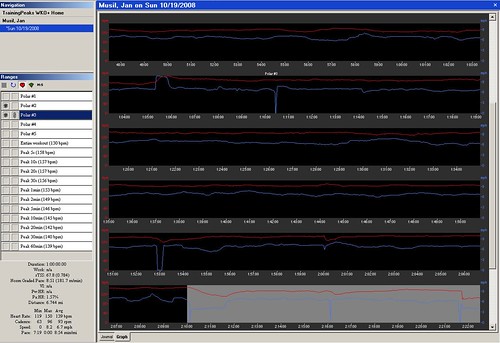
Last step in WKO+ is to load the workout results to the TrainingPeaks.com along with comments for my coach. The TrainingPeaks.com then lets my coach review the workout in detail and if I want I can share the workout with my friends via Facebook or just send people link to the workout details.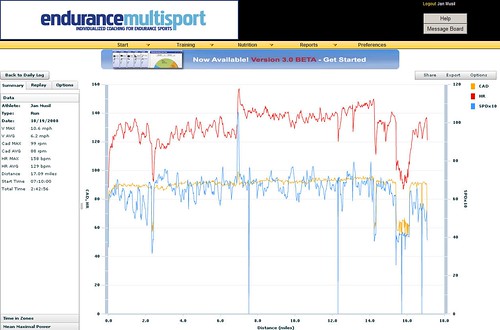
After that I take the R-R file from the workout and dump it into the FB Athlete for very quick assessment. I do not rely much on the FB Athlete in my training and use it to assess and cross-validate the overall weekly load. The FB Athlete computes EPOC and Training Effect for individual workouts and that is all I use it for. I do not utilize the Training Coach function. Here is a picture of the FB Athlete page. 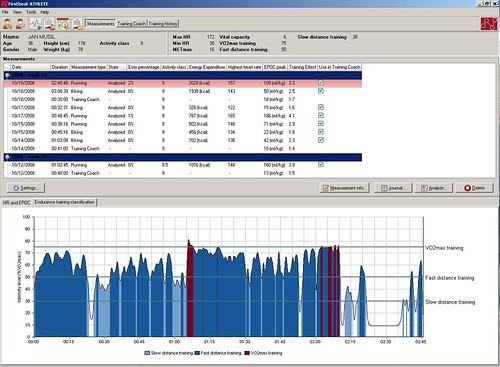
For some workouts I review the graph showing which part of the workout I spent in which VO2 zone. It is interesting to see where I labored more than I should have. But I do not really rely much on the FB Athlete results and use them only as additional info.
Week, month and season assessment
On regular basis I review the weekly, monthly and entire season statistics. Most useful are the graphs I get from the WKO+. The program comes with pre-defined set of graphs that you can modify or add new ones to analyze your entire season, previous few days or specific date range. I have bunch of graphs on my overview page that show me weekly training volume and time for the season, HR distribution for the entire season and then the same graphs for each sport. For cycling I have a section that shows distribution of power in automatic buckets and also in training zones, mean maximal power over the previous month with mean heart rate, mean maximal power and mean maximal pace for the season and week, training stress and intensity factor for biking and running, cadence for biking and running, performance management chart and summary of the training with weekly and monthly average HR, TSS, power and pace. If you want other stats you can play around with the graphs and get them displayed on your athlete page in the WKO+. Sample of the page is below - not all graphs are displayed. Again as for other WKO+ related details read the WKO+ help on-line.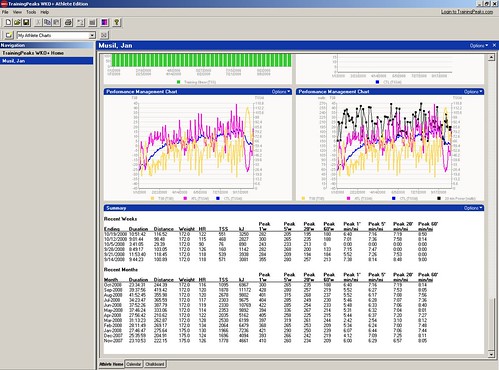
Second area where I look for overall data about the training volume is the TrainingPeaks.com - the Annual Training Plan shown on the first picture in this article shows the volume per week. The Actual field then indicates with color code whether I trained just enough (no background), more (red) or less (yellow) that planned.
As a secondary information for my weekly load I look at the overall EPOC for the week in the FB Athlete. The summary of the week is on the right side of the picture below.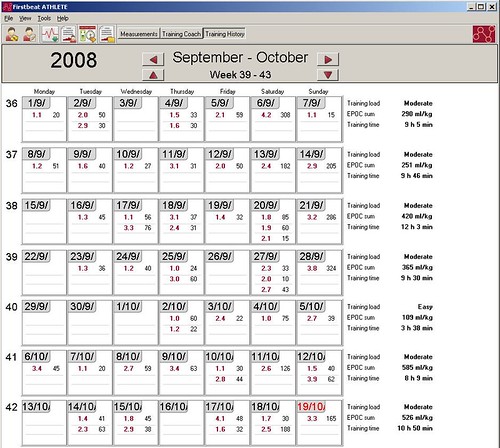
If I used the FB Athlete for training planning I could also look at the training plan that dynamically changes as the workout results get loaded to the software. According to the software help the recommended training sessions should be taken as recommended durations and TE levels. If you need more time to achieve the TE you can take more time. I did not do any analysis of this function so I can not really comment on this.
This is in nutshell how I use the software to help me train. I must admit that I'm a geek and enjoy playing around with gadgets and hoard data that I can later review and analyze. It is important to say that you do not need to do all this to be successful. The most important part of all this is actually me working with personal coach. The rest is just making it more fun for me to train...
October 16, 2008
Free wattage seminar from Allen Hunter
TrainingPeaks invited me to an on-line seminar with Allen Hunter where he discussed the power files of following riders from the Tour de France - Adam Hansen, Markus Burghardt and George Hincapie. The seminar shows the analysis of the power files in the WKO+ and is quite interesting for anyone training with power or thinking about it. You can view the seminar on Peaks Coaching Group website. Highly recommended.
January 6, 2008
How does it work for me: Recap of using the F.I.R.S.T methodology for running training
 You may have heard or read about the Furman Institute of Running and Scientific Training program that has been documented on-line and also in the recently published book Runner's World Run Less, Run Faster: Become a Faster, Stronger Runner with the Revolutionary FIRST Training Program. The program is based on three weekly runs (interval session, tempo run and long run) complemented with two (or more aerobic cross training sessions). The runs are done at prescribed pace in order to achieve speed improvements, improve lactate threshold and VO2max.
I was very excited when the book came out, because the traditional "run every day" program does not work with family, triathlon training, full time job, and all the other stuff that life throws at you. I decided to start the F.I.R.S.T. training plans for the 5k race right after the triathlon season was over (after the September 23rd race). Unfortunately I injured myself in the week before my last triathlon race (a stupid mistake when I stepped off of the running treadmill) and I had to take things lighter over the next few weeks to heal the ankle sprain. For the training I used my 5k PR from the September sprint triathlon to determine the training paces. The book recommends to use recent 5k race results or longer distance race that is then converted to the 5k equivalent.
First training sessions felt quite hard as I used to run little slower even on hard days. So it took some adjusting. Especially the interval session was hard to do and I found myself feeling sick from my stomach after the sessions. I did majority of the interval sessions on treadmill to force myself to stick with the prescribed pace for the whole interval duration. In the recovery part of the interval I keep moving, but quite often need to resort to fast walking to catch my breath and sustain the next interval work. The tempo training is fairly manageable and I alternated it on the treadmill and outside (depending on the weather and the time constraints). The long runs are generally fine as the pace is little slower than tempo, but they get harder in the last 1-2 miles. In all the sessions I found myself checking the watch more often in the last part of the session. I complement the running with bike, swim and strength training to reach the planned number of training hours in the week (determined by my training plan on trainingpeaks.com).
So how did it all worked for me. Let me just say that my 5k PR improved from later September to mid November from 22:15 to 21:35. That is 40 seconds improvement on the 5k race which looks good to me considering that I was unable to train through all the 5k plan sessions due to the injury. I lost about 2.5 weeks when I was unable to run at all or I had to run slower than prescribed pace. Later in December I ran another race - 5mi in 35:10 which translates approximately to 21:15 for 5k. So there is certainly good improvement after just few weeks of training. I continue using the F.I.R.S.T. plan for the upcoming half marathon. I hope the speed gains will continue and I'll be able to run the half in under 1:45 (well maybe even faster). We shall see how the speed translates from the short distance race to the longer distance race.
September 21, 2007
Swim start
Friend of mine sent me this link that shows the benefits of training smart and simulating the race conditions. I'm sure you will like it as much as I did.
September 16, 2007

Few weeks ago I learned on the Nike+ community discussion board about great stretching book – Anatomy of Stretching. It was published only recently and as opposed to other books on this subject this one actually shows graphically which muscle group is being stretched in a particular position. Other books I reviewed showed the graphics of how to perform the stretch, but were not very specific on which muscles are stretched. I prefer format of this book to the others.
It took me few days to force myself to start reading the book – much like it takes me some convincing to stretch after the run or bike ride. As runners say – runner has right to claim that the stretching is over when he/she bends over and ties the laces. Since I started reading it I identified few key stretches that I need to do after each running and bike riding session. I have not yet put much thought into the stretching after swimming. But after each run and each bike ride since my last race I have spent some time stretching the legs and I have incorporated few additional stretches into my day routine. The person who did my bike fit told me to do stretches during the day when I have time – like when making coffee in the morning or while I wait for the sandwich to heat up on the grill. By doing that I can easily do 20–30 minutes of stretching a day without even trying too much. I’m starting with that so we shall see how it goes.
August 29, 2007
1 cm can make a huge difference

No this post has nothing to do with what you may be thinking, but rather with a good bike fit. I told you few days ago that I scheduled a bike fit at the Cadence bike store in Philly. I did not want to brag about the bike fit before I had completed at least one long ride. And long ride it was - this past Saturday I had the longest bike ride of my training - 4 hours of riding (more on that later). After the ride I can say that the bike fit really helped. But let's take it step by step.
Bike fit
The bike fit was an interesting experience. The whole session took little over 2 hours. We started with short discussion and filled out a form about my riding skiils, performance, goals and problems I perceive with my fit. Then Brady (my fitter) took some basic measurement that are needed for the fit including analysis of my feet, flexibility in different positions and only after about 30-40 minutes of doing this I was allowed on the bike. Brady told me that I look crammed in the bike and that my knees are little on the outside. Then we started to tinkle with the seat position - raised the seat by 1 cm and moved it about 0.5 cm to the back. I was riding it for a while and it seemed ok. Then Brady took a look at my cleat position and re-measured where they should be. We replaced the cleats and put them to where Brady felt they should be - I was riding with cleats too much in the front of my foot - that explains the pain I had after the long rides from pushing the pedals practically on my toes. Now the cleats are much further in the back and I'm pushing the pedals with less effort and there is no pain in my toes even after very long rides.
Long ride
Saturday morning was very humid - actually the visibility was about 15 meters in a foggy mist, just great conditions for bike riding. I took off at 6:30 and started riding shortly before 7am. The fog was condensating on my classes. I had to wipe water off of the glasses every 10 - 15 minutes just to be able to see. On the other hand it was really nice day and I was very happy that there was no cross-wind. I also had my new aero helmet which is really cool. I definitely had a great ride and averaged 22.5 mph (while on the bike) and 19.5 with all the pit-stops and refueling stops. I did 4 loops around the lake which comes to little over 82 miles. On the 4th loop my friend Steve joined me and kept my pace in check so I was able to finish the ride feeling quite well. The three laps I averaged 55-58 minutes per look which gives me a hope that I could do the bike leg of the race in little under 3 hours. I definitely trust my biking skills and with the new fit and helmet I'm ready to ride 56.7 miles and feel good.
Sunday run
I started Sunday training early with 50 minutes swim and transitioned immediately into the long run of 2 hours. I ate nature bar before the swim so I was not feeling hungry during the swim or shortly after. Before I headed out of the house for the run I filled-up the fuel belt with water and took 3 GU gels with me. I also took one gel just before heading out and washed it down with water. The run was fine, but I was unable to go very fast - I actually had troubles keeping the 8:00 min/mile pace on the flat stretches and the hills were as slow as 11:00 min/mile. I felt tired especially after mile 8 and eventhough I hydrated. It got even worse after mile 9 when I ran out of water and gels. So I basically shuffled back home and finished the day with 12.5 miles eventhough I had hoped for 14 miles. Well I'll take it - the day was very humid and hot - it was 83 F (28 C) at 8 am and it got worse as my run progressed. Actually the weather on Saturday and Sunday was quite bad for training - the temperature climbed to 95 F (35 C) and humidity was very high - normal August weather in Philly, but not good for running. And I guess the 82 miles ride on Saturday did not help my run either. But it is a great practice for the race - I'll not be fresh when it gets to the run - in fact I'll be like 4 hours into the event with my glycgen stores running low and lactate build up getting up there. So yeah it will be fun and quite a challenge.
Subscribe to:
Posts (Atom)


 Posts
Posts

