Showing posts with label Polar. Show all posts

June 20, 2011

Polar what were you thinking? Why I'm keeping RS800cx and sending the RCX5 back

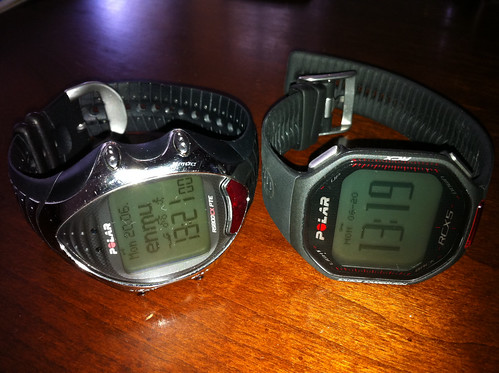
Polar may not like me for saying this, but the RCX5 does not seem like the winner I was hoping it to be based on the marketing materials and buzz. Over the past few days of playing with the RCX5 run package I made decision to send it back to seller. I was hoping that Polar finally has a great unit for multi-sport athlete, but they did not quite get it. It certainly is not replacement for RS800cx as it has been understood by many users. If anything it is an upgrade for RS400 users.


I have been using RS800cx for over 18 months and like it quite a bit. I think that even now it is the most flexible training heart rate wrist unit in the market. I will continue to use it since the RCX5 unit has many serious shortcomings to fit my needs and to replace or even complement the RS800cx. This article is a short summary of the main reasons for this decision. I hope it helps people make decision of whether they should be keeping RS800cx or replacing it with RCX5. So lets get started with the gaps I discovered.


RS800cx RCX5

First up is lack of altitude recording - Polar designers what were you thinking? This unit is targeted to triathletes that are known for being data obsessed. Altitude data is quite important for post workout analysis and the unit that does not capture altitude is utterly useless for TSS calculations and even less advanced run analysis.


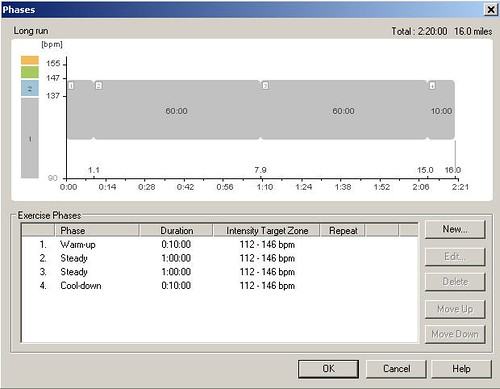
Second - planned exercises have two major issues. First one is that currently the unit supports only 4 phases (that can be repeated) in the planned exercise which is just very basic and major step down from 12 phases that RS800cx supports. This may be fine if your exercise structure is fairly simple - like warmup (1st phase), intervals with fixed recovery (2nd and 3rd phase), cooldown (4th phase). If you have ladder workout then you are out of luck with the 4 phases.


Third major gap is that there is no way to schedule cadence based workouts - really? How often do people perform cadence drills or hill simulation workouts with 50-60rpm in big gear - I do quite often. So this is a major problem. This can also be problem for running if you are trying to improve your running cadence. RS800cx does this with no problem. Again Polar what were you thinking?


Fourth - forcing users to use polarpersonaltrainer.com - while I see benefit of moving the data to cloud and generally do not disagree with this concept I do have a problem with the way Polar implements this. I have NO WAY TO DOWNLOAD DATA TO MY PC DIRECTLY and load them to WKO+ or TrainingPeaks.com. Yes there is way to load data to PolarPersonalTrainer.com and then download them back to my PC so I can finally load them to TrainingPeaks.com. Yeah that sounds like 5-10 minutes per workout file. Not interested. Hint for Polar team - look at how Garmin does this - they have a fairly simple client on the PC/Mac that is capable of storing the files locally so people can actually use them. Also having to synchronize planned exercises with the web makes it hard to make last minute changes in exercise - again Garmin's model may be way to go here - their small client lets you create and synchronize planned exercises.

Update 2011/06/21: Fellow blogger and Polar enthusiast pointed out that I missed one feature in the Polar software that lets users extract the data files from the HRM to local files. He has blog post in German on his site that you can read crudely translated to English here. It shows how this can be done.

So there are really only 4 reasons for me to send the RCX5 back. When it comes to it the first two items on this list are the most significant reasons why the unit went back since I do not see how Polar can address the first one and while they can probably work on the second one I do not see that happening any time soon. So I continue to use RS800cx as it is definitely superior to the new unit.


Fifth - lack of support for pre-defined exercises outside of the Plan. This is something that I really like on RS800cx. I do few run and bike sessions quite regularly and I see no need to schedule each one of them in my diary. I do have bunch of pre-defined exercises like pickups, on-off repeats, recovery runs with pace limits, recovery spins with HR limits stored in my unit and can use them without any additional work. With the model implemented in RCX5 it is no longer possible.


These are the five main reasons for me to send the unit back. There are other, less important functions, that RCX5 leaves out compared to RS800cx. Just check the Polar discussion boards for more details.
Funny thing is that I did not even get chance to train with RCX5 due to my injury. I just played with the unit on PC, Mac and polarpersonaltrainer.com to simulate the training needs I know I have when I'm in full training. In the end this may be a blessing since I will get full refund and not just partial.


Well I must say that while Polar is not going to get my money for RCX5 they did get few things right in the unit. Here are the few things I wish RS800cx did for me that RCX5 does - HR recording during swim, heart touch function, being able to switch off HR belt for specific sport, easier way to switch between sports in multi-sport exercises. But these are not important enough for me to overlook the major 5 issues I described above.


My recommendation for anyone who already has RS800cx and is happy with it - keep it and if you want something new get the GPS G5 sensor which is really small and you may also get the new cradle for S3 sensor that is for RCX5 and holds the sensor better on the shoe. Otherwise I do not see any reason to upgrade to RCX5. I hope Polar has another unit in development that will replace RS800cx and will be step above RCX5. I really wish it was more like RS800cx and less like RS400.


Disclaimer - none of the units in this review were provided to me by any company or indicidual. I paid for them with my own money which I hope to get back (at least for the RCX5). I like Polar products and as their loyal customer I feel obligated to call them on products that they did not get quite right.

March 21, 2011

RCX5 teaser on Youtube

Reader *Y* alerted me to this video that was posted by Polar Singapore and later announced by Polar USA on their Facebook page. It is not exactly great look at the watch, but you can catch how it looks like in better quality that what the leaked picture shows (see the previous post from Saturday).


March 19, 2011

New Polar RCX5 triathlon unit coming out soon

The internet has been buzzing with rumors about the new triathlon unit from Polar. First discussion appeared few weeks ago on Slowtwitch where users Chris and wvarta from Polar noted that new products are indeed going to be announced as soon as April. It seems that the news will be announced sooner since there is new thread on Polar forums linking to leaked picture of the new watch and to French Polar site that is promising announcement of new unit the Polar RCX5 on Monday March 21st.

Good source in Polar confirmed we can expect announcement on Monday through Polar USA Facebook page. So stay tuned until Monday. I certainly hope Polar listened to our feedback and added at least some of the highly requested functions to the watch.


rcx5.JPG


From what you can see from the picture it looks as if the new unit has dual belt (e.g. belt that works with both W.I.N.D. sensor and the older 5kHz frequency which is great news for people going to gym often and missing their HR on the display of treadmill or stair master). It remains to be seen if the watch itself works on dual band as well which would make it able to record HR under water - common complaint to Polar, Suunto, Garmin and Times as none of these units does this so far. The next improvement seems to be with the GPS unit as Polar is introducing a new one with this line the G5 - it is hard to see what the sensor looks like, but I would expect longer battery life and better GPS sensor inside.

The next improvement is use of the new Polar WIND Link unit for data transfer which works similar to Bluetooth so there is no need to have line of sight between the unit and the USB sensor. S3 sensor seems to be slightly different shape, color and the fork that holds it in place seems to have different shape as well. So we will see what the improvement is there.

The unit itself looks like little bit of a come back to the original design of Polar watches from 70s (or it may be just the picture). And it seems that there will be different color models - orange and black are showing on the picture. The prices seem to be around the same level as for the RS800cx units today - from 299 EUR for watch with belt and WIND Link to 399 EUR for the multisport pack with GPS unit.


Well that is what I can glean from the picture. Rest is to be revealed I'm sure soon. By the way if the unit is any good on the paper I'm most likely going to upgrade - especially if the GPS works well I may prune my HRM stash and just stick with one or two instead of current running count of 5+.

March 29, 2010

Garmin, Suunto, Polar and Timex new gadgets and updates

Garmin110.jpgLooks like GPS is becoming more pervasive in fitness watches - Garmin today announced new running watch Garmin Forerunner 110 that will bring GPS to what seems like more basic watch than FR205, FR305, FR405 and FR310xt. Main theme seems to be simplicity with high level of accuracy. They will be showing the units at the major marathons in Boston, Paris and London so the watch seems to be geared to runners, walkers and joggers. For triathletes it seems that the 310xt remains the flagship.


timexironmanglobaltrainer_lg.jpgTriathletes are probably looking forwards to the release of the new Timex unit that is the first version of Timex watch with built in GPS. They already have experience with GPS technology, but never had it integrated in the watch. We will see how well this will be done. From available information the unit will be ANT+ compatible so if you have ANT+ compatible power meter or HR belt the watch should be able to communicate with them.


Polar is releasing new sleek cycling computer CS500 that is based on their proprietary W.I.N.D. technology used in CS600 and RS800/RS800cx lines of products. The design looks very clever for cycling - I hate switching displays on CS600 especially when I wear my gloves and I'm in traffic. The rocker design seems to make it all very easy. Not sure though if I upgrade. The announcement on Polar site does not list power meter as one of the compatible accessories which is a shame. I hope it will work with it since I'm getting another Polar power unit I found few days ago so I can put it on my new road bike.


SuuntoBlackFlame.pngAnd last news is from Suunto that is releasing new designs of T6 line with release of three new color schemes and different packaging under the T6d name. According to their announcement the new units will ship in few weeks and will include the dual belt, but otherwise seem to be exactly the same as T6c. The new designs are Black Flame - black yellow (pictured), Black Smoke (Black and gray) and Black Fusion (Fusion with black housing - as opposed to the greenish one that currently ships). So unless you die to spend over 400 bucks for different design of the watch there is really not much new in terms of technology or functionality. Still the units look very good.

May 13, 2009

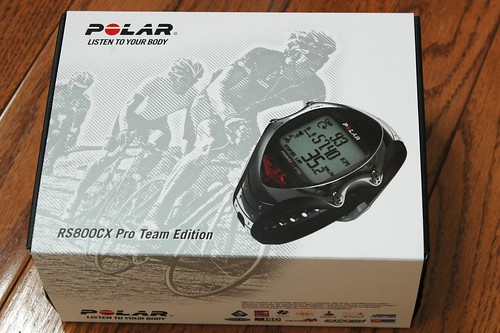
RS800cx Pro Team Edition hands on

I reported earlier that Polar is releasing new version of the RS800cx to the market geared towards cycling community. The RS800cx Pro Team Edition has identical functionality as the RS800cx model already released last year. The major changes are in the design of the watch and packaging.

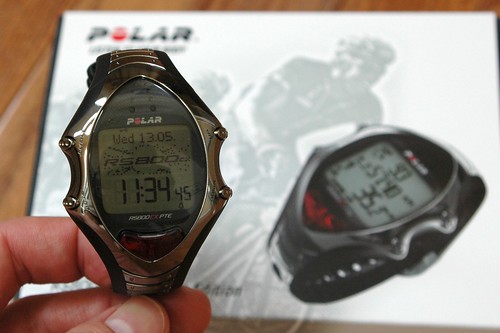
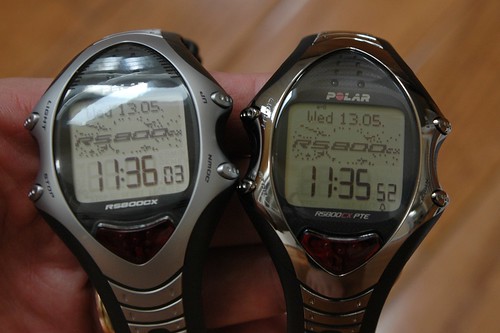
Let's start with the design - while the standard RS800cx body is made from gray plastic with silver face and silver bars on the watch band the Pro Team Edition watch body is black with polished metal on the watch face and the bars on the band. It looks stunning and the look changes with changing light conditions which is great. At first I was not 100% sure I like it, but wearing it for last 24 hours changed my view. It is almost like having multiple watches on your wrist during the day.

The second change is in the packaging. The watch comes with the CS speed WIND and CS cadence WIND sensors, black version of the IR USB stick for data transfer, Polar Pro Trainer 5, watch band extension, USB cable extension and manuals.

The retail price is set at 449 USD, but you can get one with discount at the dealer I used and if you search a little you can find additional 5 or 10% discount that they will gladly accept. I was amazed how quickly the watch arrived - I placed the order on Monday at 4pm and the watch was at my door on Tuesday late afternoon. I did one bike ride with it so far and like it a lot - well I love the RS800cx to start with.

Here are few pictures of the box, watch itself and comparison of the original RS800cx and the new Pro Team Edition.


RS800cx Pro Team Edition box

RS800cx Pro Team Edition

RS800cx Pro Team Edition vs. RS800cx 2008 Edition

By the way if you are interested in slightly used RS800cx in absolutely mint condition with ZAGG screen protector on the face I have one for very reasonable price. Drop me a note on Twitter or in comments. I'm keeping the Pro Team Edition and do not really need two RS800cx.

Updated May 18th 2009

May 7, 2009

Polar Pro Trainer 5 on YouTube

Just came across this great overview of PPT5. It highlights the key benefits of the software and shows the granularity to which you can plan training and analyze workout data. Polar is still the best for this from what I have seen and used.

New look and feel for Polar RS800cx, T6c, T3c and Suunto foot pods

Both Polar and Suunto are adding new look and feel to the top of the line HR monitors this summer. Both companies announced new version of their watches.

Polar is introducing RS800cx Pro Team Edition package at the beginning of the cycling season. Its functionality is identical to the RS800cx and the package (at least in the US) will contain cycling speed sensor and cycling cadence sensor. You can add running S3 sensor and G3 GPS sensor to the watch as accessories. The watch has functionality just like the RS800cx only different case design. The package will contain the YSB IR stick and the Polar Pro Trainer 5 software for planning and evaluation of your training. I had chat with one of the dealers of Polar watches and they should have the watch in stock in the next few days. Polar announced that several pro cycling teams including Quick Step, Rabobank, and Caisse d'Eparge will use the Pro Team Edition in training and racing.

RS800CX_PTE_km_front_240x298.jpg
RS800CX_PTE_km_topleft_240x298.jpg

Suunto is also introducing a new look of two HRMs and foot pod. If you always wanted to have a watch that Matty Reed, Andy Potts, Javier Gomez, Jan Frodeno and other Suunto ambassadors use you will have your chance in late May or early June (depends on locality - US dealers should have watch in stock in mid May [updated following conversation with dealer in the US]). The T6c Red Arrow will be available for purchase to mark Suunto's collaboration with ITU and timing the Dextro Energy World Championship Series. The watch has just different color, otherwise is identical with the regular T6c that is currently offered as either Black (more like greenish black) or Fusion (combination of red and greenish black). I confirmed with Suunto dealer that the watch will be offered as standalone with no sensors. No specific packages have been announced yet, but that may come later (just like with T6c the triathlon package was announced few weeks after official release of the watch).

Suunto-T6-c-RA.jpg

In addition to the T6c Red Arrow Suunto will be offering new design of T3c - Black Arrow that will have identical functions to T3c and should be available in the same timeframe as the T6c Red Arrow. In addition to the new HRMs Suunto will also introduce red and yellow version of their foot pod in case you wanted to draw attention to your foot pod. The black version of the foot pod will continue to be offered. From materials that are available on Suunto site it does not seem there were any changes in the Foot pod or the HRMs other than new colors.

t3c_Black_Arrow_150x190_v3_m56577569830806139.jpg
FootPods.jpg

March 29, 2009

Random items

I haven't been keeping up with this blog lately. It has various reasons that can be summarized as family, work and training keeping me crazy busy. I decided to post a summary of random items and thoughts related to training and other mostly sport activities I did or plan to do in the near future.


Let's start with training

Training has been going real well. Craig and Erica keep me on my toes and I must say that the training makes me feel like I'm building a solid engine to carry me through this season. I may have mentioned it here before, this year I focus on longer races and will be doing quite a few 70.3 races. Actually 70.3 is my focus for this year and I plan to do a long course aqua-velo race in late September as preparation for full Ironman in 2010.

Weather has been turning nicer in PA and running outside is going well. Today was my first day on the bike outside and it was a blast. I did little under 3 hours ride in the neighborhood and enjoyed every bit of it - even the climb to South Mountain. It was a fartlek ride so I did some fast climbs, easy riding, fast descends, long steady segments - had it all on this ride. Tomorrow is long run and I wonder how well my legs will carry me in steady state run with 20 minutes tempo and pick-ups to 5k race pace thrown at the end. Should be fun. Next week is my very first duathlon on Sunday. Still need to sit down and think through the race plan. I seem to do better when I have solid plan preferably with backup going into the new race format.


Quakertown 10 miler

Few weeks ago Dasa and I ran races in Quakertown. Dasa did the 4 mile run and I did the 10 miler. If you are not familiar with the area where I live let me describe it to you - fairly hilly. Locals call it PA rolling terrain. People from flat lands would probably call it bloody hilly. In any case the 10 miler was on fairly hilly terrain and it is one of the races that tests your pacing strategy. Dasa did very well in her 4 miler even though she was not happy with the hills and had to walk parts of the course. I did quite OK in the 10 miler and recorded a new PR - well I kind of expected it as last time I ran 10 mile race was 10 mi South Mountain race and that is just one hill - all the way up and back down. This Quakertown 10 miler is little easier and sports more varied terrain (not climbing up for 3.5 miles and then running back for 3.5 miles as on South Mountain). In case you want to check the terrain and my race log you can look at the Training Peaks for details.


New products from Polar

I have not been checking the Polar product pages over the past few weeks, but I remembered seeing a new add in Triathlon magazine - something about 3D training. The watch in the add looked new so the other day I browsed through the Polar running and multisport computers and noticed few new things. The S625X seems to be phased out from the product line (at least it no longer appear on the polar.fi pages. The S725X is still being offered and effectively can be used instead of S625X if you add the foot pod.

But more interesting is the new watch for recreational athletes - RS300X. It looks like a replacement of the RS200 watch, but it adds the ability to work with G1 GPS sensor for speed and distance. It seems to be geared to runners, but I assume that it can be used for cycling, walking and other activities if you use the G1 GPS sensor to record speed/distance. Looks like a nice basic no frills watch for people that want to keep their training simple and still get the benefit of speed/distance and heart rate. Polar sells the watch in few packages - base watch without any speed/distance sensor, second is bundled with S1 foot pod and third option comes with the G1 sensor. Each package contains the HR Wearlink+ belt with T31 HR transmitter. The watch comes in black or orange color (just like the RS200 used to be offered in black and red). The pricing in the US is very reasonable 170 USD for the base watch and 250 USD for one of the packages with either S1 or G1. You can actually get them for about 20 bucks under MSRP from most dealers. I hope I can get my hands on one to provide more details.

Another big news that I have not touched on is the availability of the CS600X which is an upgrade of the CS600 bike computer that enables GPS location recording (just like the RS800cx does). I have not seen the unit yet, but expect that it provides the same capabilities as CS600. From the manuals it looks like it has larger memory and few minor differences. But the core functionality is very close to CS600. Just like CS600 Polar offers the CS600X in two boxes - one without power and one with power. If you already own CS600 with power you can simply swap the CS600 head unit for CS600X (and sell the used CS600 on eBay). All sensors should work fine with the CS600X as they also use the W.I.N.D. technology. I do not believe there is an upgrade program offered by Polar in any country.


Suunto X10 and Geocaching

I have got the Suunto X10 ABC watch few weeks ago and really love it. I do not use it for running or biking (well I may take it on some bike rides or runs when I plan to get lost and use the track back home function). But I started to get my feet wet with geocaching. I'm just getting started and attempted to find only two caches. One successfully one was hidden very well so maybe next time. It is an interesting way to explore the neighborhood - I never knew there are about 20 caches in 20 miles radius around my house. What I like even better is that Ian likes it too and seems to be interested in finding the caches. We have yet to find one where we can take something (and put something of similar value back). It seems like a good fun and great way to get out of the house for a walk in the park. If you never heard about geocaching you can find more info on the geocaching.com site


Scuba diving thoughts

Few years ago when we went to Dominican Republic for vacation I got certified in open water diving by PADI. I have dived on subsequent trips to Caribbean and enjoyed it a lot. But in the past few years I have not done any diving. Last year when Erica and Craig organized open water swim in Dutch Springs I envied the groups of divers getting ready to go under. I'm thinking about taking refresher course this year and doing some diving on weekends when weather gets warmer. I'm sure I can enjoy the diving even in the colder water of PA. Obviously trip to Caribbean would be nice, but I do not believe it will happen any time soon... Any triathletes out there that also do diving? Any tips for getting started again?

February 3, 2009

Few new HRMs from Garmin, Polar and Timex

This is just a quick post about some new HRMs that either already hit the market or will be released in upcoming weeks. There are some exciting new HRMs in the line-up of manufacturers that will make the 2009 season pretty interesting.


Garmin - leaving the GPS out


Let's start with the recently announced line of Garmin HRMs that are not sporting GPS capability. The FR60 that will come in mens and women version is HRM with ability to connect with ANT+ heart rate belt, foot pod, bike pod and cadence pod from Garmin. The watch will have standard set of features including ability to record up to 15 hours worth of workouts and capture 100 laps. Just like the Forerunner 405 this watch will connect wirelessly to your computer and transfer data to Garmin Connect site. According to the materials available on Garmin Blogs and Garmin site the watch will not support Training Center and programmed guided workouts. The watch should hit the market in Q2 of this year.


Polar - pushing the GPS to cycling

Polar just yesterday announced release of the CS600x cycling computer which is an enhancement of the flagship CS600 cycling computer. The CS600x integrates with the G3 GPS unit and captures the location information just like the RS800cx unit that was released late last year (and extensively reviewed on this site). The unit is sold in two packages - one with power and one without. It is very same packaging as with the CS600. None of the packages comes with the G3 sensor, but you can get the G3 sensor as an accessory. Other difference that I noticed from the comparison tool on Polar USA site is that the CS600x comes with the IR USB stick (just as the RS800cx). There are probably other differences, but they are not immediately apparent from the product description and feature list. Also I expect that Polar may make minor adjustments to the information on their website just as they did after the release of RS800cx.


Timex - focusing on the basics

Another addition to HRM line comes from Timex. The Timex Race Trainer Kit provides a good starting level HR monitor with ability to transfer data to ad from the computer wirelessly. What is interesting on this product is the fact that you are not only buying the watch, but also the access to the Timex Ironman online training site that is build on top of the Training Peaks engine. The watch integrates with the training site and according to the information available on Timex site there is ability to download workout data from the site to the watch and send the workout results to the site. Sounds like an interesting HRM for focused training. The training plans are designed by Dave Scott and Gale Bernhardt two large names in the triathlon world. You can find more details about this package on Timex site. Unfortunately I can not provide any more details on how well this package works as I have not used the watch or the Timex site yet.

January 12, 2009

Polar RS800cx or Suunto T6c that is the question

How is that for controversial title? I have just recently received few question from people trying to decide between the two monitors. As you probably know I own both of them and do not plan to let one of them go any time soon. In fact I find both good at what they do, but if you have money just for one what should you do? Well you will need to decide for yourself, but this post will hopefully provide some information that make the decision easier.

I'll use the same format I used in the other comparison article in June of 2008 - Q: Garmin Forerunner 405 or Suunto T6c?. I made few changes to the T6c text reflecting my longer use of the watch. But most of it remains the same as 7 months ago. Note that I ultimately sold the Garmin Forerunner 405 on eBay after I got tired of it. I'm sticking with the RS800cx and T6c for now.


Training planning

Polar RS800cx - it will be of little surprise to readers of this blog, that I like the abilities to program variety of guided workouts in this watch. It offers so many options to structure workout that I have yet to find a workout I can not program in it. You name it - ladder intervals, sessions with various interval length, phases focusing in cadence, pace or HR. You can do it all. Do you need to workout for specific time or until your HR raises to specific HR, etc. So in training planning I really prefer the flexibility and functionality you get in RS800cx. You can define workout in the watch, but I prefer to use the Polar Pro Trainer 5 software to plan my training sessions.

Suunto T6c - has some planning capability in the software, but the guided workouts are to be defined directly in the watch. You can define warm-up duration, countdown duration (in case you want to do warmup, but not include it in the total exercise time), then there are two time intervals or you can use distance intervals (again only two). You can define how many times to repeat the intervals and that is it. I find this fairly good for less structured training sessions. So I use the T6c on simpler workouts - like tempo runs or recovery runs that are easily fit into the format of warm-up and two interval timers. (In June I wrote that I felt the RS800 was more robotic way to do the workouts - I do not feel that way these days. Perhaps I was on the edge of overtraining and needed to step back. The switch to T6c certainly helped that. These days I train with both and as I wrote above the RS800cx is for more structured sessions and T6c for sessions that have little less structure). The T6c is very similar in training planning abilities to S625X from Polar in terms of interval workouts.


Training

Polar RS800cx - what I like in RS800cx is the ability to define up to 3 pairs of shoes with different calibration factors. So you do not need to mess with the CF before each run if you decide to wear different shoes or just switch from road to treadmill. The actual execution of the training session is very well supported by the watch. It has very clear and loud beep when switching from one planned phase to another. Also the limits alarm beeps loud enough to hear it if you exercise with headphones. The watch provides information about many parameters of your session from overall perspective or individual laps. After each lap watch briefly displays the summary for the lap and if if is changing from one phase to another it shows the new phase title. This is very useful when you have multiple phases and in the middle of the exercise forget what is next - the watch will remind you. I also like the little repeat calculator in the right bottom part of the screen that shows you how many repeats of the phase or phases are remaining. It is very useful especially in case of interval training when you may miscount - yeah it happens to me all the time. Another great thing on the watch is the display. It shows bunch of data which can be overwhelming at times, so I tend to stick to 2-3 displays that I configured to provide the key information I need (jut FYI the watch has 6 displays you can configure yourself, one multi-sport display which is discussed later in this text and one display for count-down of the current phase). The count-down display shows the counter of the current phase with time remaining and information about the limits - e.g. HR, cadence, etc. Other stuff that you may like in this watch is the recording of your location if you use the G3 GPS sensor, recording of cadence both in cycling and running. There is more about this unit in the three detailed articles I wrote last year after I had the watch for few weeks. I will not go back to that discussion here.

There is doubt that this watch provides the most functionality out of any HRMs I owned so far. The only missing piece is the automatic switch between the sensors - like from bike to run. But the watch manages that OK. You can stop the exercise, switch to the other sensors and start a new session. The watch will prompt you if you want to combine exercises and if you do so it shows a new display for multi-sport workout. The display shows overall time, distance and calories burned in the combined session. You can combine multiple sessions into one and then review them later in the software.

Suunto T6c - works like a charm for running and biking (and with memory belt also OK for swimming). The watch is able to automatically switch between sensors (pods) if you use multiple in one session - bike pod, foot pod, GPS pod. Like in the triathlon race. The comfort HR belt is very nice - I find it even more ehm comfortable than the Polar WearLink+ and it works very well once you figure out which part to moisten. The watch has configurable screens - 2 screens 3 lines each and the last line can show multiple items that you can switch between. Other that that the watch displays the EPOC and TE on the fly, but I find these values less accurate than what you get later on the computer.

The really cool feature of this watch is the automatic switch between the sensors. I did a brick session and it recorded my bike speed / distance (as 18mph), then I did a lap for transition and headed out of the house for a short run. Before I hit the street it was already switched to my foot pod and was showing my pace 18:30/mi as I walked and soon 7:45/mi as I started running. It is pretty cool to see this working after struggling with this with Polar, previous Suunto and Garmin. This may not be as important for single sport athletes, but quite nice for triathletes. Especially if you want to have one less thing to care about in transition. That is also one reason T6c will remain in my collection. I plan on racing with it again this season.


Evaluation of training

I guess this sentence from original article summarizes it well: "Well compared to Polar software both Garmin and Suunto have a long way to go."

Polar RS800cx - Polar Pro Trainer 5 offers certainly the software with most bells and whistles for analysis of single workout or reporting over a defined period of time. I love the ability not only to define own sports, but for each to set the speed/pace units that I want to see in the graphs, different HR zones for each sport and the ability to define my own reports and customize how they look. You can easily take any set of HR zones and synchronize them to your watch in case you wanted to switch between them for cycling or running session. The calendar view and summary for the week is also quite useful and shows you actual vs planned - number of exercises, training time, distance and actual burned calories.

I also like the way Polar stores the log files in individual text file. I can modify the logs if I need to correct data from the session. Like this past weekend when I had an occurrence of CS600 not connected well with my HR belt. After the session I had all HR data in RS800cx log and all the power, cadence, speed data in the CS600 (but no HR). I simply took the logs opened them in text editor did one large copy/paste and saved the log. Everything was saved and I could do the analysis I needed to do with HR, power data. While I had few cases when CS600 did not capture my HR data I never had issue with RS800cx. If you are interested in R-R data analysis the RS800cx can capture the data and you can later analyze them in the Polar software (which has very limited analysis functions) or load them to other R-R analysis tools like FirstBeat Athlete or Kubios HRV.

Suunto T6c - the biggest difference between T6c and other HRMs is the analysis of your workouts to provide EPOC and TE. The standard STrM software does the basic analysis and shows you the data recorded by the watch - R-R data, HR, speed / distance and all the parameters the software calculates based on the R-R. I use also the FirstBeat Athlete software mostly to help me look at my EPOC load during the week and month. The STrM is not as flexible as PPT5 and while it allows definition of multiple sports it supports only one set of HR zones. I find the analysis capabilities of the software little limited compared to PPT5. The only exception is the TE and EPOC that Polar does not provide in their software. But if you use the FirstBeat Athlete you can get the EPOC and TE post workout if you load the R-R files to the software. I found the fine tuning of the parameters for the accurate EPOC/TE calculation somewhat complicated when I first got the watch. But that is no longer the case since Suunto published the manual from Eddie Fletcher that describes how to best setup the watch. Key is to determine your activity class based on your weekly training load and your VO2max either via lab test or based on field test or race result. The manual provides great examples and makes setting-up the watch much easier than before it was published.


Daily use as a watch

Polar RS800cx - I wore the RS800sd on daily basis for over a year and the RS800cx is the same 'format'. It fits well under shirt and can be used as daily watch. It is just a tiny bit smaller than the T6c, but it is hardly noticeable. The alarm of this watch works fine and can be snoozed for 10 minutes if you want to get more sleep.

Suunto T6c - It is a watch that you can use daily. It fits under the shirt and goes with pretty much any outfit (especially the black version that is not as flashy as the Fusion). I pretty much alternate between T6c and RS800cx as my daily watch. I do not mind wearing either one of them. You may prefer Suunto if you need multiple alarms to get out of the bed - T6c has 3 of them, but does not offer snooze.


Cost

Note that this section reflects the situation as of January 2008 and that I looked at prices on US market. The prices are likely to change over time so do your research, check sites that sell Polar and Suunto watches. I also strongly recommend to only buy from certified distributors and resellers of Polar and Suunto to prevent any warranty repair issues. Both Suunto and Polar confirmed in telephone that they honor warranty from Amazon.com where I made most of my purchases in the past few months of HRM shopping.

Polar RS800cx - the watch alone is now about 400 USD + tax. You can also buy a package with the watch and either S3 sensor for running (470 USD), multisport package with G3 sensor for 470 USD or bike package with bike speed sensor for 430 USD. The additional sensors go for 140 USD for the S3 foot pod, 130 USD for the G3 GPS sensor, 55 USD for cadence WIND sensor and 55 USD for bike speed sensor WIND. Do your math before you buy as certain combinations of packages and additional sensors could be less expensive than others.

Suunto T6c - The watch sells for 335 USD for Black version and 350 USD for Fusion version. The foot pod for 80 USD, bike pod for 50 USD, the road bike pod for 57 USD and lastly the GPS pod for about 150 USD. Suunto also offers various packs with T6c - Triathlon pack with all you need for triathlon including memory belt for 660 USD, Running pack with T6c and foot pod for 470 USD and Multisport pack with GPS sensor (does not capture location) for 530 USD.


Conclusion?

Well you will need to make one for yourself. If you can go look at both models in the store or at the race expo and test them out before you purchase. They are both very good HRMs and will help you structure your training. As for me I'm going to keep both of them on my wrist as I train. One at a time to be exact. I will cotinue to use the T6c for less structured sessions and RS800cx for sessions that are more complex. I will continue to run road races with RS800cx and do triathlons with T6c. Let me know if this helped a bit in your decision making.


Update (13/1/09): In case you want to read more about the RS800cx you may like to review few earlier articles on this blog:

RS800CX - more detailed review of the functions I.
RS800CX - more detailed review of the functions II.
Analysis of training data (part 3 of RS800CX reviews)

There are also few articles about Suunto T6c that I published earlier.
December 31, 2008

Protect your investment

So you have got yourself the gadget you wanted so much. Now you are starting to use it and discover its capabilities. You exercise with it and sometimes even wear it the whole day. That's all good and well, but did you happen to think about protecting your investment. It is no fun to find dings or scratches on the watch face after just few weeks or months of use. I actually experienced that first hand with the Suunto T6c Fusion I bought earlier this year. The watch suffered two dings and few small scratches on the face, even with Suunto stating that the watch has mineral glass that should be fairly resilient to abuse.

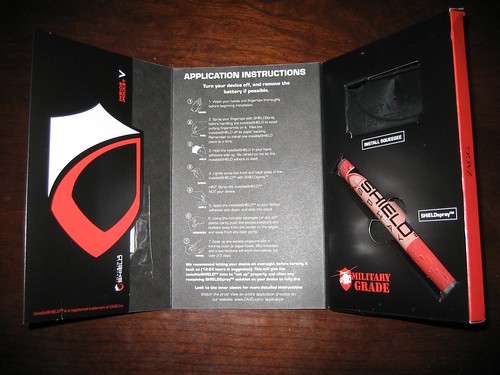
Most of the newly designed HRMs leave the watch face unprotected. Older models like Polar S625X, S725X, Suuto T6 had raised edge that protected the watch from accidental hits. The new watches like Polar RS400, Polar RS800 / RS800cx or Suunto T6c do not have this protection. While I have only the best experience with durability of the RS800 model I did not want to take any risk with my new gadgets. Looking through the discussion forums I came across ZAGG Invisible Shield protection foil. Apparently this is thin plastic foil that you install on the face of the watch and it will protect it from accidental damage. It does not protect any other part of the watch, but in my experience the glass is what gets damaged most often. Few weeks ago I installed foil protection on my new Suunto T6c and about a week later I got another foil to protect my Polar RS800cx.


Invisible Shield box

The installation procedure is very simple, but you will want to plan about 15-20 minutes for it. You will also want to do the installation in the comfort of your home or office. You will also need to have very clean hands when installing the foil - it may be easy to get your fingerprints all over the foil or watch if you do not clean them up front. You will also need to clean the watch from any sweat or smudges before you begin. Then follow the instructions and apply the provided spray on your hands. Spray the foil and put it in place. Then slowly and diligently press out the bubbles out of the foil and make sure it fits well. If you do not get it the first time just take it off and start over. I had to repeat installation on the RS800cx three times before I got it right. With the angled face it is somewhat more difficult to install the RS800cx foil that the T6c foil, but ultimately they both get installed in about 10 minutes. After you are happy with the install, dry off the remaining spray from the watch and set it aside for few hours. ZAGG recommends 12 hours, but I used mine in workout the next morning after the install - so about 8-9 hours later with no issues. Below are two pictures - first one of RS800cx with the ZAGG foil and the second Suunto T6c with the foil. Note that the pictures are extreme close-ups of the watch. In reality you can not see the edges of foil on any of the watches.


T6c with Invisible Shield


RS800cx with Invisible Shield


The foil works fine during the day. You can not really see that the watch has a protective foil on its face unless you are looking for it. In low light conditions the Suunto T6c gets little dim as the back light seems to be weaker than to one on RS800cx. I used the watch during ride to the shop in the evening and it was little hard to see the time when I switched on the back light (note I did not even try this while running when the watch actually flickers). Otherwise I did not determine any issues with the protection foil. I have exercised with both HRMs inside, outside and wore each one of them for few days as a regular watch. I highly recommend the 10-20 bucks investment to protect the watch that is most likely 20-30 times as expensive to replace. ZAGG also makes protection foil for cell phones, MP3 players and computers. But I have not tried one yet. If I were to buy a new iPod today I would definitely put Invisible Shield on it to protect it. It would prevent bunch of scratches that I have on my iPods after the abuse they get through during the almost daily use.

December 30, 2008

Location info on the Polar RS800cx

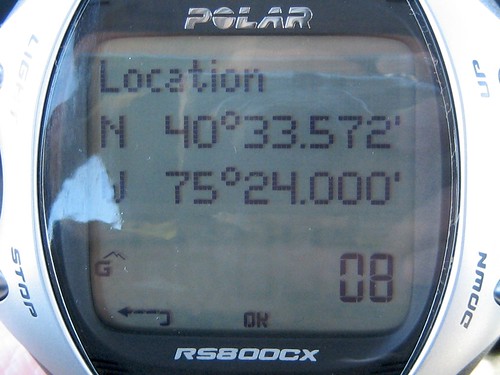
This is just a short note for the few people that are interested to see how the location information appear on the screen of the RS800cx during the exercise. As I wrote in my other articles here, here and here the RS800cx tracks location, but it does not display map or outline. It only shows the location coordinates as captured by the GPS unit and the number of satellites it has acquired (lower right corner). Below is the picture of the location screen.

Location info on RS800cx

You can access this screen from the pre-exercise or exercise pause screen. You get to the pre-exercise screen following ways:


  • Start from time screen and click the red start/lap button once. Wait for the unit to connect to the HR belt and then scroll to options and make sure the GPS is on. Switch on the G3 unit and wait for the watch and unit to start communicating. Once the connection is there and G3 acquires satellites the watch will display message 'Satellites found'. Now new option 'Location' appears in the menu. When you select it the above screen will appear.
  • Second way to get to this screen is from exercise mode. We assume that you exercise with GPS switched on and that the GPS unit communicates with the watch. Press the Stop button once to get to the pause screen. Then scroll down to the Location option and it will give you the location information.

It is fairly easy to use although it provides only basic location data. I do not really use this - well maybe except than to check whether the G3 has satellite connection and how many satellites it acquired. From Polar materials it is clear that the watch is not capable of navigation like the Garmin HRM units (Forerunner 305 / 405 or Edge 705) or X9i / X10 from Suunto. But that is not what it was designed for. I guess what it means is that if you seriously need navigation capabilities you may need to look at other unit or get a backup GPS navigation unit in your backpack. These days they put the GPS chips into pretty much everything. I have one in my cell phone, I have seen them in kids shoes and even pet collars.


December 9, 2008

No HR in your CS600 log? Resolution is here.

Several people in Polar forums reported issues with CS600 logs not showing any HR and RR data. It seems that there is a bug either in the transmission from the watch or in PPT5. I discovered that you will not any HR if you start the HRM before the HR shows on the CS600 display. Member BorutV confirmed that the logs staring with few zeroes are not displaying any HR in PPT5. In any case there is a workaround. Just follow these simple steps and you should get the log with HR and RR data without any issues:
  • Wear the HR belt
  • Press the red button once
  • Wait for the HRM to find and connect with the belt - basically until the HR appears on the display
  • Now you can press the red button again to start the exercise

November 10, 2008

Calibrating Polar foot pods

This past week there were few discussions on the Polar forums about the calibration of the foot pod with Polar watches. It does not really matter which watch you have S625X, S725X, RS400sd, RS200sd, RS800sd, RS800cx or the new FT60 or FT80. If you use foot pod you will get better results if you calibrate it. With all foot pods in the industry it is true that they are sensitive to your running style, running form, surface you run on, type of the course you run on, etc. Over the years I found that for the best results it is good to keep track of most common calibration factors for combination of surfaces you run on and shoes you run in. I keep a running tally of calibration factors for all pairs of shoes I run in and generally keep at least two calibration factors (CF) - one for running on my treadmill at home and one for running outside on the road. I do not do much of trail running, but if I did I would keep that as a separate CF.

All depends on how much accuracy you strive for. The S1 and S3 foot pods from Polar will give you result within the 5% range of accuracy out of the box. That may be sufficient for some folks, but if you want to be more accurate I suggest to calibrate. All Polar HRMs I used so far let you calibrate the unit by either running pre-determined distance and then correct the lap distance manually or by manually adjusting the CF. I prefer the manual calibration. In order to determine the new CF I run known distance of at least 1 mile. Sometimes I take the measurement multiple times to get better feel for the accuracy. I record each calibration run in a spreadsheet and look at the new CF from the run (or multiple runs). In case I have multiple runs I may take average of the CFs or eliminate the obvious error CFs and take average of the CFs that are quite close. Sometimes you may hit the lap button too early or too late and that may mess-up the CF calculation.

Actually I have a mile long distance measured from the corner of my street to another corner and I use that for all my outside calibration runs. That makes it easy to repeat the calibration when I need it - even like the day before the race if I want to be 100% sure the calibration is OK.

If you want to be super accurate - which may be important for some track workouts you will want to run mile repeats at constant pace and record the laps at different speeds - like 8 minute mile, 7:30, 7:00, 6:30 and 6:00 or faster. Your CF may be slightly different for different speeds, but this is too anal even for me. I usually run with just the CF for combination of shoes and surface. Most of my calibration is done at pace between 8 minute mile and 7 minute mile and they work quite well even for running intervals at 6 min mile. Especially the S3 foot pod is less susceptible to pace changes and accelerations / decelerations that the S1 does not handle as well. The S1 may not give you 100% great distance in interval run - it is best to calibrate it well for the interval part of the workout and just ignore the pace / distance recorded in the recovery sections of the workout.

If you are calibrating on treadmill it is best to use the exactly the same treadmill every time. If you go to the gym you may need to repeat this for few machines as they tend to be quite abused and each may produce different results. You also need to understand that all you do in this process is that you are calibrating your watch to show the same numbers as the treadmill - no guarantee that the treadmill itself is accurate. They quite often are not. If you run for a week in a hotel - don't even bother to calibrate. It is pretty much waste of your workout time. The calibration itself on the treadmill is easy - just hit the lap button at some nice round number, keep running until you ran 1 mile (or longer) and then plug-in the number to the spreadsheet and you know the new CF.

I use the spreadsheet I was referring to in the text above - you can download it from my website. It is very simple and all it does is that it takes your input of the actual distance, old CF and watch displayed distance. I then tells you the new CF and % accuracy of the previous CF. I use it to fine tune my CF over time. If you do this over time you may achieve quite good accuracy. I ran 5 mi race last December in which I had recorded 5.03 miles over quite varied terrain - hills and flats on the road. Now we can discuss whether it was the CF fine tuning or just dumb luck. I'll let you judge it.

Remember that the CF is quite important if you use the software like WKO+ to calculate your intensity factor and TSS as for running. The software uses normalized graded pace to determine how hard the workout was - if your calibration is off you may be working at lower or higher intensity than what the software tells you.

OK so you have determined new CF - what do you do with it? Look at your manual and follow the instructions to change the manual calibration factor. Most Polar HRMs support only one CF at the time so you will need to remember to modify it for each workout. If you have the new RS800CX it allows you to maintain up to 3 pairs of shoes each with different CF. I currently use two pairs of shoes for my running - one is calibration for running outside and the other one for running inside on the treadmill at my house. In other cases like the RS800sd and RS400sd you can define different sports and assign the CF to the sport. When you then define guided workout remember to set the 'Sport Profile' field to Sport-specific settings which will pick-up the pre-set calibration factor from the PPT5.

I hope this helps people deal with the calibration topics. Let me know if you have any questions.

October 31, 2008

Response to recent reader comments

My apology for recent quit period - I have been taking few days off with my family in Florida and did not have much time left for browsing the web much less for posting anything on my blog. But I'm back and will continue to report on my training and the use of heart rate monitors and possibly new segment on using power on the bike. In the meantime I owe few answers to readers of this blog. I thought I'll take opportunity to combine this post with the answers to the questions posted under the last article about RS800CX and third party (non-Polar) software I use to analyze the workouts. Thank you all for coming back to my blog and keep the comments coming.


Comment from paradoxtk: In the review it seems you get the most information out of WKO+ comparing to FB Athlete. FB Athlete seems only to deliver some information about the workload of your exercises while with WKO+ it seems you are able to do more finegrain data analysis. Is this assumption right? But on the other hand WKO+ seems to be useful mostly for power-oriented analysis.

In my particular case I get most information out of the WKO+, but that is mainly because I have a coach that plans my workouts and do not need to rely on the software. For WKO+ it is quite important to use the power meter, otherwise the TSS/IF can not be calculated for the bike rides. You can still get TSS/IF for run workouts as well as normalized pace and HR/pace decoupling for long steady state workouts (well that is where it makes most sense to look at it anyways). For swim workouts I follow Joe Friel's advice he gives his athletes (see his blog) - e.g. easy workout has TSS of 30 and very hard one TSS of 100, then multiply by number of hours of the workout duration. I use this guideline also for bike workouts on stationary bike in the hotel if I do not have power meter with me or in case my foot pod battery dies half way through a very long run - like that never happened ;-). Otherwise the WKO+ and FB Athlete are different types of software. The WKO+ does more detailed analysis of the workout as well as provide a long term progression information through the performance management chart and weekly / monthly stats. The FB Athlete provides very detailed analysis of the R-R data and helps determine EPOC and Training Effect for each workout as well as provides program to improve the fitness with dynamic program. I just do not use the program as I have a coach that plans my workouts, but if you do not have coach this may be a good way to moderate your stress level in a program. Self coached athletes tend to work too hard all the time and do not always realize when to back off.

Jan, what software (either WKO+ or FB Athlete) would you suggest for the Polar RS800CX as supplement to the Polar Pro Trainer SW? (in other words: without a powermeter, but with RR-data functionality)

In this case I would probably ask what is your situation - e.g. how do you plan your season and do you know how to put together your plan. If not you may be better off to rely on the FB Athlete to help you plan the workload. If you do already plan your workouts and look for better way to analyze your progress then the WKO+ may be better option as the FB athlete does not provide as much detail as what you can get from WKO+. And you can self-assess the cycling TSS according to the guideline quoted above.

Yesterday i finally reveived my RS800CX! :-) After first tests and after configuring the watch i tried to build an exercise that uses a sport profile and individual sportzones. Unfortunately i was not able to do so. It seems the watch does really only support one sportzone set at a time. It seems it is not possible to deploy different sportzone sets in planned exercises by using the sport profile function. Can you confirm this by testing it yourself? Otherwise this could also be a bug in the PPT SW, but i do not think so. But nevertheless, i really like this watch! :-)

Congratulations on your new gizmo. As I posted earlier the watch supports only one sport zone, but you can still create the workouts that combine bike/run sport zones. You just need to set the HR limits as % of max or as actual beats per minute. I tested it for the brick workout and it works fine for the workout guidance - e.g. the watch will show you the right range you should be in for each phase you programmed in PPT5. But the issue comes when you look at the workout result in the PPT5 later - only one HR zone can be used for displaying the information - you can switch between the zones and tweak them after the workout, but it still gives you only one zone for the entire file. I found it more useful to record the brick as separate workouts and then look at them either individually or assess them as a multi-sport workout in PPT5. I'll do some more writing on this in a week or so.


Comments from Mogens:
I have the same feeling as paradoxtk regarding FB Athlete - it seems that you are lacking confidence in the programs functinality. So my question is - do I need to buy FB Athlete to analyse R-R data or is it possible to use PP5's OwnOptimizer/overtraining status?

You can certainly live without the FB Athlete and rely on Polar OwnOptimizer function to monitor your training load. I use FB Athlete as a validation of the total EPOC I accumulate during the week. But as you correctly stated it is just a validation. I already own the software and only use functions I really take advantage of. I do not lack confidence in the training program it suggests, but I also do not feel like using it when I have USAT certified coach planning my season. I really do not need the coach function in the software, but folks without access to coach may find it useful as it seems to periodize the workouts quite well. Quite often my workouts are either spot on or close to the training effect that the software suggests. While on other days my plan is totally different - like now the software does not know I'm fighting flu while my coach does. So my coach re-designed my week to take it into consideration while the FB athlete assumes I'm well rested and suggested workouts with TE of 4.8 for tomorrow - that would probably not help me. So if you decide to use the software do it with a bit of caution as it does not consider all aspects of your training. All it does is it analyzes your training load and based on it suggests next few days of load (it obviously does more than just that and the algorithm is I'm sure very sophisticated, but in a nutshell the description is correct).

You seem to have a lot of experience with diffferent kind of software related to triathlon - did you ever look at a software package called PC Coach?

I'm afraid I did not have the pleasure of using the PC Coach. Before you buy make sure the software is compatible with the RS800CX. You can call their help desk and I'm sure they will help you. I believe the company also sells the Polar products so they will be able to help you. The only contact I had with the company was indirect when I read their older article about the Timex, Polar and Suunto HRMs.


Comment from Gorka:
I'm 90% sure to buy the RS800CX MULTI (with two bike sensor for VTT and road bike). I know that this watch can not be used as navigator (I understand navigator as something that tells me which way to follow). But, does the Garmin Forerunner 405 give this options? (I suppose that not, but I'm not able to find something that it confirms this). Thank you very much.

Gorka, the navigation features in Forerunner 405 are very basic - it basically points you to the next waypoint and depending on the software you used to plan the route it can be on the road or not. It does not have a map or visual indication of where you are in comparison to the next waypoint, just an arrow that points the direction. It is OK for running and I used it on one long run just to test it out. I was not impressed, but it may be good enough for finding your way around if you upload the route to the watch prior to the training ride. Friend of mine had only the best to say about the Forerunner 305 for navigating him on his bike rides. The display on 305 seems to be better for this type of navigation, the 405 has fairly small screen. You can get the 305 fairly cheap now - if you are in the US the REI discount is coming soon so you may be able to snatch one at very reasonable price. If price is not a concern a lot of cyclists use the Garmin Edge 605 or 705, but they are much more expensive than the Forerunner 305. Note that the Forerunner 305 does not have a map, only a drawing of relative position of you vs. the planned route. Check Fred's page linked above for actual pictures of how it looks.


October 21, 2008

Analysis of training data (part 3 of RS800CX reviews)

This is a third article focused on how I use the HRM in training. If you missed the previous articles you can find them on this site. Follow the links below:

RS800CX - more detailed review of the functions I.
RS800CX - more detailed review of the functions II.

I selected a different title for this post than for the previous two as it is not much about the RS800CX watch, but more about 3rd party software I use for analysis of data that I gather during training. I'll also make references to CS600 with power sensor as that is what I use on my bike and the software analysis tools leverage the power data. And lastly instead of discussing the programs one by one without much context I'll talk about the entire process from the workout planning to the analysis of results of individual sessions as well as weekly, monthly and season.

Before we get down to the details let me talk a little about the software I use for my training. First up is the TrainingPeaks.com - website designed for endurance athletes that fully follows the Triathlete's Training Bible from Joe Friel (and also Cyclist's Training Bible from the same author). The Training Bible outlines a very structured approach to planning an entire racing season and periodizing the training for peaking at the key events. The TrainingPeaks.com site helps with planning the season, setting the goals and monitoring the progress.

Second software I use is the WKO+ from the same group that developed TrainingPeaks.com. The WKO+ used to be called CyclingPeaks and was geared towards cyclists, but in the recent few updates the software introduced features that help runners assess their workouts. As you can expect there is integration between the WKO+ and TrainingPeaks.com.

The third software package I started to use recently is the FirstBeat Athlete. The FB Athlete provides wealth of features including the Training Coach, but I use only parts of it that I found useful. I do not use the Training Coach in the FB Athlete as I prefer to rely on real coach rather than have software determine my plans for me. But there are folks that rely on software for fitness level training and are quite happy with the results. Now with the major packages introduced let's look at how I use them through out the season.


Season planning - the big picture

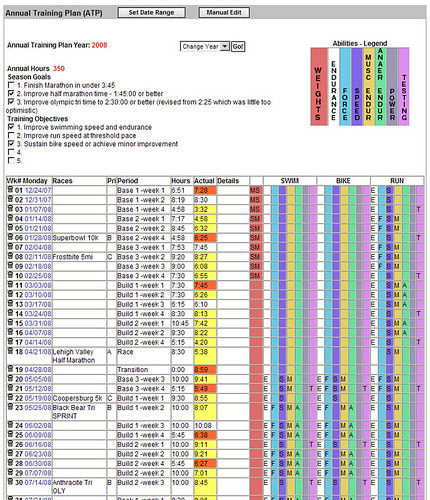
I'm not going to describe the whole Training Bible philosophy here, you can read it in the Training Bible books (note that new version of The Triathlete's Training Bible will be released soon, I suggest you to wait for it as Joe Friel made significant revisions to the book as he discusses on his blog. In short the season planning is done after your last priority A race in the previous season. The planning starts with setting the preferences for the next season like annual training hours, time frame, your personal data, then you are guided through setting the season goals and assessing your limiters. In the next step you plan individual races for the season and prioritize them as A, B or C events. Essentially the A events are the ones you will taper for and B, C events are either tune up races or testing races. It does not mean that you do not push hard in B or C race, it just helps you structure your plan. Once you set the races and their priorities the site will compute your annual training plan. The training plan basically spreads the annual training hours through out the season and assigns each week to a specific training phase (transition, preparation, base, build, peak, race). There is logic in the software that assigns the hours to each week according to the phase that you will be in during that week. You can adjust the annual training plan any time later or even re-calculate it during the season in case you need to re-assess due to unforeseen circumstances. The next step is to plan your week. The picture below shows the annual training plan that already has workouts logged against it (new one would be empty). Also note that the training plan has section for strength training, swim, bike and run and for each week you can determine which abilities you will work on (see the colorful bars at the top of the picture). The annual plan suggests the sports you need to work on based on the races you planned, but you can modify the plan as you see fit. There is much more that you can do with the plan, but as an introduction this is hopefully sufficient.

04 TrainingPeaks ATP


Planning training week

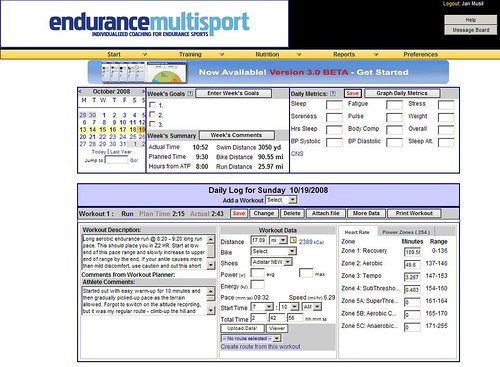
When I started training few years ago I used to put plan for the entire build-up to the A-race into the TrainingPeaks.com and it was typically a plan I derived from a book or combination of few canned plans. Few months ago I hired a coach and no longer do the detailed weekly planning. I receive them and execute them to the best of my ability. Typically my coach plans first few days of my week on Sunday the previous week and the rest in early part of the training week. There is a general schedule we agreed in the beginning that is pretty much dictated by my work and family commitments. If I have any changes to the general schedule or my status (like injury or sickness) I advise my coach via e-mail or through the TrainingPeaks.com site. The next picture shows the completed week (actually this is my last week) with individual workouts and instructions from my coach.

01 TrainingPeaks

The second picture shows one of the planned workouts. Besides having the workouts on-line the site also sends you e-mail (if you chose to) with the workouts for next two days. If you need to you can move workouts around (unless they are from your coach - then you need to ask for them to move it).

03 TrainingPeaks-workout

For more complex workouts or for workouts in which I want the HRM to monitor key parameters of the workout I create planned workout in PPT5. In the workout I set the limits as I need them in the specific workout - for cycling sessions it is generally HR, cadence or power (I use CS600 with power), for run sessions I use mostly HR limits. I do not plan swim sessions in the PPT5 as the S625X does not support guided workouts the same way RS800CX and CS600 do. Plus when I swim I just have a printout of the workout in a ziploc bag on the pool side and follow it - not a big need to have the watch beep at me. Example of workout in the PPT5 is below.

11 PPT5-workout-plan

The planned workout is then transferred to the HRM and I execute the training session according to the guidance. In case of simple workouts I use the Free workout type from the watch which does not have any guidance and is ideal for self-guided workout.


Workout analysis

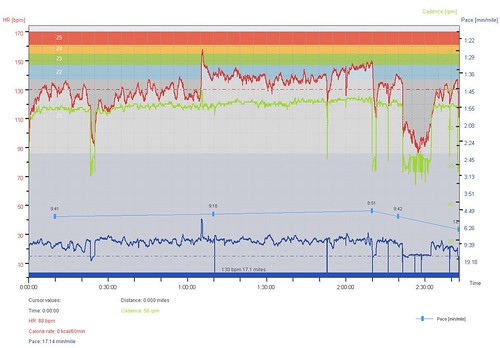
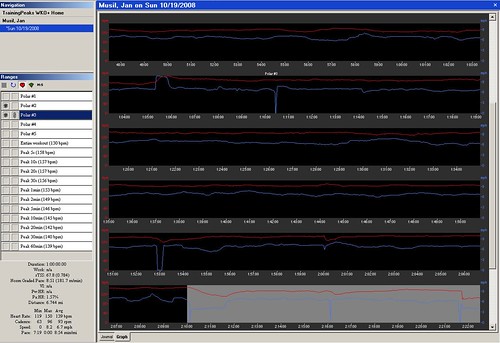
After the workout is complete I load it to the PPT5 and look at the key parameters of the workout. The PPT5 has been discussed in the previous articles so I'll not go into too much detail here. Typically the assessment consists of reviewing the pacing information, looking at whether I reached the workout goals and assessing where I had troubles. This may be a very short assessment for some workouts like easy recovery workout where I would only check if I went too hard at any point. For specific workouts like long bike, brick or long run I would look at the splits, power output (in cycling), pace, cadence and other variables on the chart shown below.

12 PPT5-workout-result

The PPT5 allows to change the selection (the thick blue bar under the graph) and select specific segment or segments (even non-continuus) and then review parameters for the selection. I may also add notes, laps and correct the errors in the recording (which does not happen often).

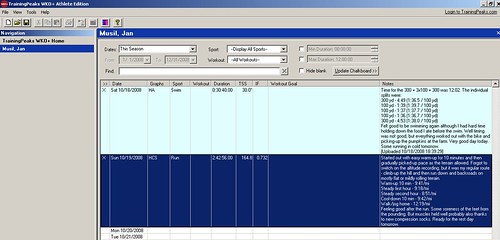
Once I'm done with the workout editing in the PPT5 I take the hrm file and load it to the WKO+. In the WKO+ I look at the overall training stress score (TSS) and intensity factor (IF). Note that the TSS and IF get only calculated for cycling workouts with power and running workouts with pace/distance data.

21 WKOplus-record-workout


Then I look at the individual parameters of the workout and review the power zones (for cycling) and HR zones (for running) on the screen shown below. I also tend to look at Mean Maximal Pace for runs and Mean Maximal Power for cycling sessions. The software is very flexible and lets you define additional graphs to review other parameters of the session.

22 WKOplus-workout-detail

For majority of sessions I also look at the detailed graph and look at other parameters - like HR / power or HR / pace decoupling that is quite good way to assess your base in long steady state efforts. I may analyze cycling sessions to see how many candles I have burned - this is quite useful for race analysis to understand why you blew-up later on bike or did not have good run in triathlon race. There is just a lot you can derive from WKO+, but the software requires you to do good amount of reading of the manuals and I also recommend you to read Joe Friel's blog. Following picture shows the detailed graph of the session.

23 WKOplus-workout-graph

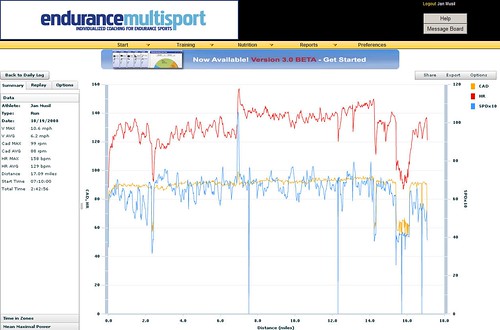
Last step in WKO+ is to load the workout results to the TrainingPeaks.com along with comments for my coach. The TrainingPeaks.com then lets my coach review the workout in detail and if I want I can share the workout with my friends via Facebook or just send people link to the workout details.

42 TP Results analysis

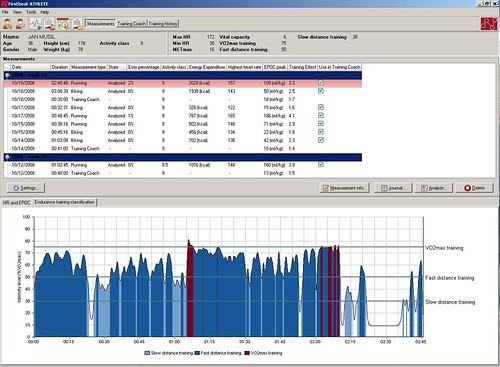
After that I take the R-R file from the workout and dump it into the FB Athlete for very quick assessment. I do not rely much on the FB Athlete in my training and use it to assess and cross-validate the overall weekly load. The FB Athlete computes EPOC and Training Effect for individual workouts and that is all I use it for. I do not utilize the Training Coach function. Here is a picture of the FB Athlete page.

32 FB Measurement graph

For some workouts I review the graph showing which part of the workout I spent in which VO2 zone. It is interesting to see where I labored more than I should have. But I do not really rely much on the FB Athlete results and use them only as additional info.


Week, month and season assessment

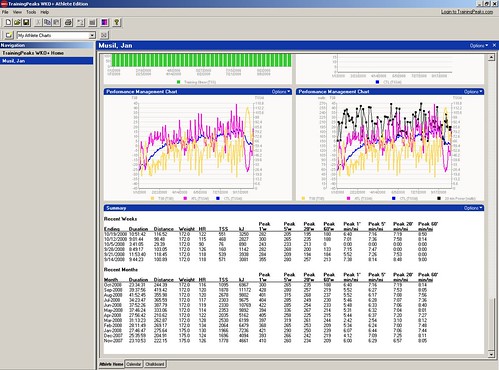
On regular basis I review the weekly, monthly and entire season statistics. Most useful are the graphs I get from the WKO+. The program comes with pre-defined set of graphs that you can modify or add new ones to analyze your entire season, previous few days or specific date range. I have bunch of graphs on my overview page that show me weekly training volume and time for the season, HR distribution for the entire season and then the same graphs for each sport. For cycling I have a section that shows distribution of power in automatic buckets and also in training zones, mean maximal power over the previous month with mean heart rate, mean maximal power and mean maximal pace for the season and week, training stress and intensity factor for biking and running, cadence for biking and running, performance management chart and summary of the training with weekly and monthly average HR, TSS, power and pace. If you want other stats you can play around with the graphs and get them displayed on your athlete page in the WKO+. Sample of the page is below - not all graphs are displayed. Again as for other WKO+ related details read the WKO+ help on-line.

24 WKOplus-season-graphs

Second area where I look for overall data about the training volume is the TrainingPeaks.com - the Annual Training Plan shown on the first picture in this article shows the volume per week. The Actual field then indicates with color code whether I trained just enough (no background), more (red) or less (yellow) that planned.

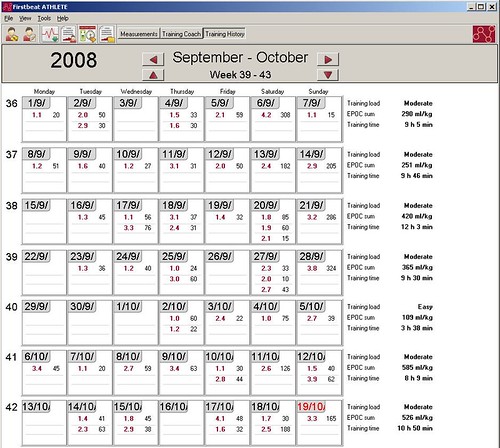
As a secondary information for my weekly load I look at the overall EPOC for the week in the FB Athlete. The summary of the week is on the right side of the picture below.

34 FB Training History

If I used the FB Athlete for training planning I could also look at the training plan that dynamically changes as the workout results get loaded to the software. According to the software help the recommended training sessions should be taken as recommended durations and TE levels. If you need more time to achieve the TE you can take more time. I did not do any analysis of this function so I can not really comment on this.

This is in nutshell how I use the software to help me train. I must admit that I'm a geek and enjoy playing around with gadgets and hoard data that I can later review and analyze. It is important to say that you do not need to do all this to be successful. The most important part of all this is actually me working with personal coach. The rest is just making it more fun for me to train...

October 16, 2008

RS800CX - more detailed review of the functions II.

Evaluation of training

This is second article that continues the discussion about the RS800CX. Today we will discuss the post workout analysis that you can do in the watch and in the PPT5 software.

As you can see from the previous article the RS800CX captures just an amazing amount of information about the exercise. In the examples here I use few different sessions to show the amount of information you get in the watch and later can review in even more detail in the software. The RS800CX is watch for anyone who likes to dig through data and wants analyze workout details for selected workouts (or all of them if you have enough time). Let's start with few pictures that show the data you can get directly in the watch right after you finish the session.

First picture shows the overview information about the workout. It includes the start time, distance ad duration of the session.

RS800CX Training Log

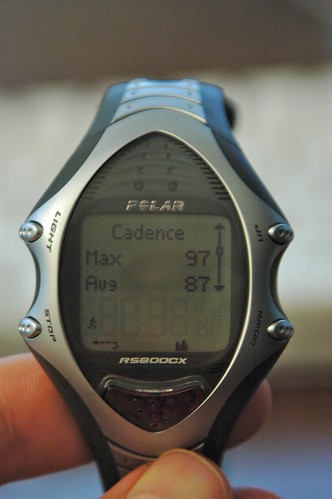
You can drill down through the data and review the min / max and average HR, calories burned, max / avg pace info, cadence (shown below), stride length [the previous two are specific to S3 sensor for the run and cadence sensor for the bike], Running Index, Altitude info, Ascend, Descend, Temperature.

RS800CX run cadence

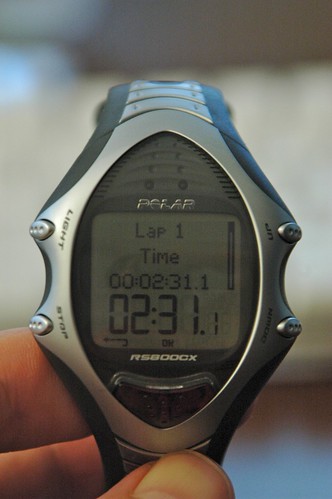
Besides the above listed information you can review the time spent in each HR zone, Time, pace, HR and other information about each phase if you followed pre-planned workout and also review the details about each lap that you recorded during the workout (see the picture below for top screen, you can then drill down to details). The amount of information is more than sufficient.

RS800CX laps info

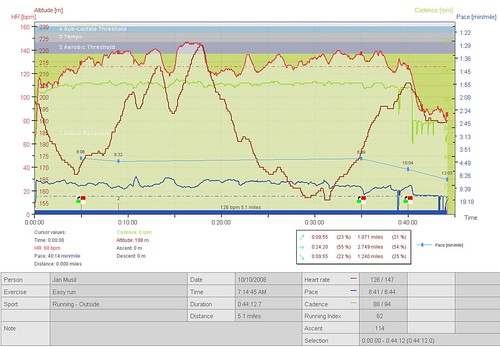
You can then transfer the data from the watch to the Polar Pro Trainer 5 software that comes with the watch and works on Windows (or if you are Mac user you can use it in Parallels, VMware or BootCamp). The analysis in the PPT5 gives you detailed data for each recording interval you selected - e.g. 1s, 2s, 5s, etc. as I listed them in the previous article. The actual workout file provides a great amount of detail from the session as shown below.

PPT5_WKAnalysis1

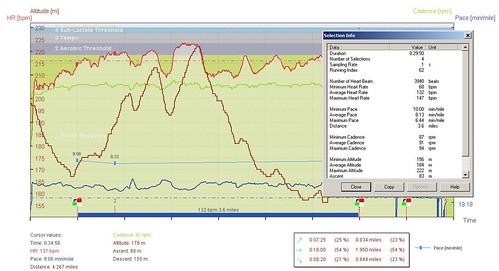
You can review each data point of each lap for various information. Additionally you can play around with the selection bar below the graph (the blue thick line) and select only specific parts of the exercise and then review the details of the selected part of the session. As shown in the example below (note that this is a different workout than the one shown on the watch above).

PPT5_WKAnalysis_selection

Generally I enable display of maximum of four variables in the graph - e.g. HR, pace, altitude and cadence which is still possible to read. But you can enable as many as all variables captured or just one - the flexibility of PPT5 is hard to beat in this segment of the software from HRM manufacturers. In the analysis you can review the lap information, change the lap type to indicate specific events during the race or training session (like I blew-up here). The colors in the background are showing the HR zones for the session. In PPT5 you can define up to four different HR sport zones and assign them to individual sports. This is extremely useful for triathletes and other multi sport athletes that train at different intensities in different sports. The watch itself supports only one sport zone, but I do not find that limiting as each exercise you define uses the HR zones of the sport you define in the software. E.g. if I define a run in zone 1 and 2 it will have different HR limits than if I define bike in zone 1 and 2 as separate exercises. It is little more complicated when you have to do a brick, then you need to set the HR zones manually in the brick phases to stay within the limits as you intend. This also introduces an issue in analysis of the brick as only one HR sport zone can be associated with one sport. Therefore I think the way Polar handles the multi-sport mode on the watch is good - record each part of the brick as separate exercise you can evaluate separately, but when you exercise you can see the combined time, distance and calories in the multi-sport view. Then in the analysis you can also activate the multi-sport view and review the workouts. Since I did not do any bricks with the watch yet I'll need to do some more research on this and report back in another article.

The RS800CX in conjunction with the Polar G3 GPS sensor captures location information for each session that you can later view in the software directly or in the GoogleEarth. The analysis in Google Earth is pretty nice as the path shows graphically not only the location but also color codes the HR zone you were in and shows the phase switches as well as the lap information. It is pretty interesting to review the workout in this way and see where you pushed harder and where you relaxed a bit. At this point you can not load the workouts to a website and share easily with friends (as Garmin Connect allows), but I have no doubt this will eventually become available on the Polar Personal Trainer on-line.

GoogleEarth

Let's look at another part of PPT5 which is reporting - most products from other HRM providers have pre-defined set of reports with very minimal ability to customize them to fit your needs. Not the PPT5 - the ability to define additional reports than the five enabled by default is great. You can customize the standard reports or define new ones as you need and then look at the data as you are pleased. It is quite impressive how much you can customize the reports and review any combination of data from your log over any period of time. Below are two simple reports showing time in sport zones per week.

PPT5_Report1

The second picture shows the run pace with average HR and distance. You can define anything you want.

PPT5_Report

In the next article I'll look at the additional third party software I use for analysis in addition to the Polar Pro Trainer 5.


Tests

A unique feature of any Polar HRM is the set of tests that Polar devised in their research and built into the watch. The RS800CX offers two tests - the Fitness Test and Optimizer Test. I run the fitness test twice a week to see how my fitness progresses over time and as part of running it I have RS800CX predict my maximum HR. The Optimizer test is used to determine whether the training is structured optimally and the test result can help determine when you train too hard or too easy. I'm still figuring this one out as most of my results come as normal training or rested. But that is probably because I have not done a solid week of full training since the accident.


Daily use of the watch


I use the RS800CX as a regular watch for daily use and find is comfortable to wear the whole day without any issues. The design is somewhat unusual and does not resemble regular watch. Some people do not like the design, but I find it OK. Not excited about it and I prefer the design of Sunnto T6 as a daily watch, but the RS800CX is in my opinion the best HRM for multi-sport athletes and I do not need to witch between different watches. I love the back light on Polar - it is easy to activate and lights-up the watch very nicely (also during the exercise under low light conditions). The watch can be set to one of two time zones and you can quickly switch between them - useful if you travel a lot. The watch also has an alarm with snooze timer - sometimes I miss the alarm, but I guess it is more of a hard sleep on my part and me switching off the alarm while I sleep (I guess I need to put the watch on the bedside table and it will be OK). Besides alarm you can set number of reminders that I use to remind myself about doing the fitness test and own optimizer test. And lately to remind me to take the antibiotics - yeah the autumn season is upon us.


Cost

The prices quoted in this article reflect the US market prices. The prices in other markets may be quite different and I encourage you to check with the Polar dealer in your region about the actual prices of RS800CX. The watch itself can be had for 400 USD on-line. Polar also ships three different packs with pre-bundled sensors that are a better deal than buying the watch only and then adding the sensors. The RS800CX RUN with S3 stride sensor sells for 470 USD, you can buy the package RS800CX Multi with the G3 GPS sensor for the same price and if you are a cyclist you can get the RS800CX BIKE for 430 USD. The individual sensors are 135 USD for G3 GPS sensor, 140 USD for S3 stride sensor and 55 USD for bike speed sensor and the same price for bike cadence sensor. You can also pair-up your RS800CX with existing W.I.N.D. sensors you may have either with your RS800 or CS600 computers.


You may also like to review the other articles:

RS800CX - more detailed review of the functions I.
Analysis of training data (part 3 of RS800CX reviews)