November 24, 2008

Kicked asphalt - or my first marathon

Yesterday I ran the Philadelphia marathon. What a great race during which I got my ass kicked. My goal was to keep the 8 minute per mile pace and finish at 3:30. I felt great during the first 10.5 or so miles and kept-up with the 3:30 pace group. Actually the 10 miles passed like nothing and I did not even realized we were already running for 1 hour and 20 minutes. The crowd support in the city was just amazing. Then I had to take a short bio-break and fell about 2-3 minutes behind the pace group. I resumed the pace and picked it up a bit on the downhill to bridge the gap. I ran another 2 miles at about 7:30 to 7:45 pace and could see the 3:30 pacing group balloons in distance. But then I had to slow down and take a minute walk. Not sure if that was mental or the increased pace was getting to me. I resumed running again and started to do math - you know like when you should be running and instead you do a lot of thinking. Yep - that was the mistake number two.

I decided that maybe I should forget about the race time and try to enjoy the time outside. This may sounds like a mistake, but I consider it one of the best decisions of the day. Then I made a pact with myself - I'll run for a mile (or about 7-8 minutes) and then walk for one minute. And I'll keep doing it until the end of the race or until I pass out. And so I did it (well I finished not passed out). It worked quite well until about mile 19 where I needed to extend the walk to 2 minutes, get gels, electrolytes and water to regain composure. For some reason it was hard for me to keep hydrating - the weather was cold and drinking cold water was not helping much.

After mile 19 it is all a big blur - beer aid station, the crowds cheering all the way on the main street in Manayunk, somebody handing out brownies, gel aid station, someone playing harmonica (or was I just dreaming at that point?), thinking about how bloody hard this marathon thing is, cursing myself for signing-up for it, and then being happy that I'm part of something this big. Wow it was emotional roller-coaster. In any case run-walk worked very well and although I was slowing it was not that bad. Around mile 23.5 I got passed by the 3:45 pace group and just knew I do not want to cross the line with next pacing group (the 4:00 crowd). I dug deep, still did the run-walk but tried to do more of run and less of the walk. Then it was only a mile and I could feel that the end is very close. The last kilometer was just plain amazing, people cheering, all the noise and I started to pass people that were struggling on the uphill. I guess the run-walk method saved me some energy for stronger finish (it was not a strong finish, I just had little more in my tank than the people I passed).

I crossed the finish line in 3:55:06 (chip time) and was glad that I was done. First thought after crossing the line - OK next time I'll be better prepared and do the 3:30. Now only if my legs did not hurt so much and my ankle was not giving me the trouble. Congratulations to everyone who finished yesterday. It was quite cold one for my taste - especially the stretch by the river.

If you want to check the details of my race here is link to the GPS map and other stats.

One addition that you can not miss - as you can imagine we have heard the Rocky song more than one time on the race day.

November 19, 2008

And now something completely different... Suunto T6 firmware upgrade

As the title indicates I will not talk about Polar in this post. I actually have news about Suunto this time. As you may remember I kept the Suunto T6 as my backup watch. Last night I sent support request to Suunto inquiring about availability of the firmware update from T6 to T6c. This morning I received a response suggesting that while the upgrade is not available in the US I can send my watch to Finland to get the update done. So this morning I filled-out the required paperwork, packed the watch and sent it off to Finland. I'll report here when I receive it back.

If you are considering this step note that the procedure is relatively expensive - shipping with tracking number via FedEx is about 60 bucks (this is the most economical way to ship with tracking and delivery in few days) and the upgrade itself is 79 EUR for the firmware upgrade or 99 EUR if you also want to get a Comfort Belt with the upgraded watch.

You may be asking why I do this. Here is the reason - this past season I raced with Suunto T6c and like the functionality of the watch for racing. I was little disappointed with the durability of the T6c watch though. When I compared it to T6 the watch face was not as durable as the previous model. I also liked the color, design and feel of the T6 on my hand better than the T6c. The T6c ended-up on eBay and I kept the T6 as a backup watch. T6 functionality is little flaky compared with the T6c firmware and I never really had success in using it in race to record the whole race without a glitch. So the ideal watch out of the two is the hybrid - T6 model with the T6c firmware. I may stick with it for races. But I'm sure I'll keep training with Polar as it has more functionality to help me structure the training sessions. I guess this will be the big decision for next season when we get close to the first race. Plenty of time until then.

November 11, 2008

Anyone running Philly on Nov 23rd?

I have not talked about training lately. But since my bike accident in late September I have been trying to get back to marathon training. I had two rocky weeks when I was suffering from cold. But I have been back on the road in the past few weeks and completed some tempo runs and long runs. With one long run little shy of 3 hours just this past Sunday.

Am I ready to race in less than 12 days? I guess I'm as ready as I can get. And I'm sure Craig has some more fine tuning in store for me. I'm ready mentally and that is what counts. I'll go out there and run as good as I can. It will be my very first attempt at the marathon distance so I take it as much as a learning experience as a race with the clock. I have my goal, but I'll be flexible and adjust as the day goes (and that means both ways). I learned on the long runs that the going gets tough past the mile 16, but I also learned that you can keep pushing and it gets better (not necessarily easier). So with the few days to go I continue running, biking and swimming. I hope to see some of you down in Philly. If you see me say hello as I do not necessarily know you :-).

I'll be in Philly on Saturday afternoon together with my support crew - my son, wife, mother in law and a friend of the family. Anyone staying over night in Philly and wanting to get together for a chat or sip of pearly water let me know. I'm chicken the night before race - no need to inflict more pain by bad habits than what the distance causes itself. But I'll for sure get a glass of good red wine the night after the race. Do you know any good restaurants downtown that accommodate larger group with a kid? I'd like to get some good, but light meal and get good sleep. It does not necessarily need to be Italian pasta, but I'm not really looking for steak house either... See you down in Philly.

Also I plan to be at the expo on Friday between 2-4pm let me know if you will be around we can meet-up and chat before I hike back to the woods north of Philly.

November 10, 2008

Calibrating Polar foot pods

This past week there were few discussions on the Polar forums about the calibration of the foot pod with Polar watches. It does not really matter which watch you have S625X, S725X, RS400sd, RS200sd, RS800sd, RS800cx or the new FT60 or FT80. If you use foot pod you will get better results if you calibrate it. With all foot pods in the industry it is true that they are sensitive to your running style, running form, surface you run on, type of the course you run on, etc. Over the years I found that for the best results it is good to keep track of most common calibration factors for combination of surfaces you run on and shoes you run in. I keep a running tally of calibration factors for all pairs of shoes I run in and generally keep at least two calibration factors (CF) - one for running on my treadmill at home and one for running outside on the road. I do not do much of trail running, but if I did I would keep that as a separate CF.

All depends on how much accuracy you strive for. The S1 and S3 foot pods from Polar will give you result within the 5% range of accuracy out of the box. That may be sufficient for some folks, but if you want to be more accurate I suggest to calibrate. All Polar HRMs I used so far let you calibrate the unit by either running pre-determined distance and then correct the lap distance manually or by manually adjusting the CF. I prefer the manual calibration. In order to determine the new CF I run known distance of at least 1 mile. Sometimes I take the measurement multiple times to get better feel for the accuracy. I record each calibration run in a spreadsheet and look at the new CF from the run (or multiple runs). In case I have multiple runs I may take average of the CFs or eliminate the obvious error CFs and take average of the CFs that are quite close. Sometimes you may hit the lap button too early or too late and that may mess-up the CF calculation.

Actually I have a mile long distance measured from the corner of my street to another corner and I use that for all my outside calibration runs. That makes it easy to repeat the calibration when I need it - even like the day before the race if I want to be 100% sure the calibration is OK.

If you want to be super accurate - which may be important for some track workouts you will want to run mile repeats at constant pace and record the laps at different speeds - like 8 minute mile, 7:30, 7:00, 6:30 and 6:00 or faster. Your CF may be slightly different for different speeds, but this is too anal even for me. I usually run with just the CF for combination of shoes and surface. Most of my calibration is done at pace between 8 minute mile and 7 minute mile and they work quite well even for running intervals at 6 min mile. Especially the S3 foot pod is less susceptible to pace changes and accelerations / decelerations that the S1 does not handle as well. The S1 may not give you 100% great distance in interval run - it is best to calibrate it well for the interval part of the workout and just ignore the pace / distance recorded in the recovery sections of the workout.

If you are calibrating on treadmill it is best to use the exactly the same treadmill every time. If you go to the gym you may need to repeat this for few machines as they tend to be quite abused and each may produce different results. You also need to understand that all you do in this process is that you are calibrating your watch to show the same numbers as the treadmill - no guarantee that the treadmill itself is accurate. They quite often are not. If you run for a week in a hotel - don't even bother to calibrate. It is pretty much waste of your workout time. The calibration itself on the treadmill is easy - just hit the lap button at some nice round number, keep running until you ran 1 mile (or longer) and then plug-in the number to the spreadsheet and you know the new CF.

I use the spreadsheet I was referring to in the text above - you can download it from my website. It is very simple and all it does is that it takes your input of the actual distance, old CF and watch displayed distance. I then tells you the new CF and % accuracy of the previous CF. I use it to fine tune my CF over time. If you do this over time you may achieve quite good accuracy. I ran 5 mi race last December in which I had recorded 5.03 miles over quite varied terrain - hills and flats on the road. Now we can discuss whether it was the CF fine tuning or just dumb luck. I'll let you judge it.

Remember that the CF is quite important if you use the software like WKO+ to calculate your intensity factor and TSS as for running. The software uses normalized graded pace to determine how hard the workout was - if your calibration is off you may be working at lower or higher intensity than what the software tells you.

OK so you have determined new CF - what do you do with it? Look at your manual and follow the instructions to change the manual calibration factor. Most Polar HRMs support only one CF at the time so you will need to remember to modify it for each workout. If you have the new RS800CX it allows you to maintain up to 3 pairs of shoes each with different CF. I currently use two pairs of shoes for my running - one is calibration for running outside and the other one for running inside on the treadmill at my house. In other cases like the RS800sd and RS400sd you can define different sports and assign the CF to the sport. When you then define guided workout remember to set the 'Sport Profile' field to Sport-specific settings which will pick-up the pre-set calibration factor from the PPT5.

I hope this helps people deal with the calibration topics. Let me know if you have any questions.

Seeking motivation to train? Here is a good dose of it.

It is the end of the season in the North East and there are no more triathlons where I live. Except maybe the ones organized by YMCA that get you do 10 minutes of each. Which is not really a lot of racing. Anyways the days are getting shorter and there is less time to get your training in. Just yesterday I started a long run at 2:30pm and finished when it was pitch black with no stars. On days like that one may need some motivation boost. The following two videos can give you some - they work for me, they may work for you as well. Check the Kona videos out. It is amazing to see the form these top pro athletes have.

October 31, 2008

Response to recent reader comments

My apology for recent quit period - I have been taking few days off with my family in Florida and did not have much time left for browsing the web much less for posting anything on my blog. But I'm back and will continue to report on my training and the use of heart rate monitors and possibly new segment on using power on the bike. In the meantime I owe few answers to readers of this blog. I thought I'll take opportunity to combine this post with the answers to the questions posted under the last article about RS800CX and third party (non-Polar) software I use to analyze the workouts. Thank you all for coming back to my blog and keep the comments coming.


Comment from paradoxtk: In the review it seems you get the most information out of WKO+ comparing to FB Athlete. FB Athlete seems only to deliver some information about the workload of your exercises while with WKO+ it seems you are able to do more finegrain data analysis. Is this assumption right? But on the other hand WKO+ seems to be useful mostly for power-oriented analysis.

In my particular case I get most information out of the WKO+, but that is mainly because I have a coach that plans my workouts and do not need to rely on the software. For WKO+ it is quite important to use the power meter, otherwise the TSS/IF can not be calculated for the bike rides. You can still get TSS/IF for run workouts as well as normalized pace and HR/pace decoupling for long steady state workouts (well that is where it makes most sense to look at it anyways). For swim workouts I follow Joe Friel's advice he gives his athletes (see his blog) - e.g. easy workout has TSS of 30 and very hard one TSS of 100, then multiply by number of hours of the workout duration. I use this guideline also for bike workouts on stationary bike in the hotel if I do not have power meter with me or in case my foot pod battery dies half way through a very long run - like that never happened ;-). Otherwise the WKO+ and FB Athlete are different types of software. The WKO+ does more detailed analysis of the workout as well as provide a long term progression information through the performance management chart and weekly / monthly stats. The FB Athlete provides very detailed analysis of the R-R data and helps determine EPOC and Training Effect for each workout as well as provides program to improve the fitness with dynamic program. I just do not use the program as I have a coach that plans my workouts, but if you do not have coach this may be a good way to moderate your stress level in a program. Self coached athletes tend to work too hard all the time and do not always realize when to back off.

Jan, what software (either WKO+ or FB Athlete) would you suggest for the Polar RS800CX as supplement to the Polar Pro Trainer SW? (in other words: without a powermeter, but with RR-data functionality)

In this case I would probably ask what is your situation - e.g. how do you plan your season and do you know how to put together your plan. If not you may be better off to rely on the FB Athlete to help you plan the workload. If you do already plan your workouts and look for better way to analyze your progress then the WKO+ may be better option as the FB athlete does not provide as much detail as what you can get from WKO+. And you can self-assess the cycling TSS according to the guideline quoted above.

Yesterday i finally reveived my RS800CX! :-) After first tests and after configuring the watch i tried to build an exercise that uses a sport profile and individual sportzones. Unfortunately i was not able to do so. It seems the watch does really only support one sportzone set at a time. It seems it is not possible to deploy different sportzone sets in planned exercises by using the sport profile function. Can you confirm this by testing it yourself? Otherwise this could also be a bug in the PPT SW, but i do not think so. But nevertheless, i really like this watch! :-)

Congratulations on your new gizmo. As I posted earlier the watch supports only one sport zone, but you can still create the workouts that combine bike/run sport zones. You just need to set the HR limits as % of max or as actual beats per minute. I tested it for the brick workout and it works fine for the workout guidance - e.g. the watch will show you the right range you should be in for each phase you programmed in PPT5. But the issue comes when you look at the workout result in the PPT5 later - only one HR zone can be used for displaying the information - you can switch between the zones and tweak them after the workout, but it still gives you only one zone for the entire file. I found it more useful to record the brick as separate workouts and then look at them either individually or assess them as a multi-sport workout in PPT5. I'll do some more writing on this in a week or so.


Comments from Mogens:
I have the same feeling as paradoxtk regarding FB Athlete - it seems that you are lacking confidence in the programs functinality. So my question is - do I need to buy FB Athlete to analyse R-R data or is it possible to use PP5's OwnOptimizer/overtraining status?

You can certainly live without the FB Athlete and rely on Polar OwnOptimizer function to monitor your training load. I use FB Athlete as a validation of the total EPOC I accumulate during the week. But as you correctly stated it is just a validation. I already own the software and only use functions I really take advantage of. I do not lack confidence in the training program it suggests, but I also do not feel like using it when I have USAT certified coach planning my season. I really do not need the coach function in the software, but folks without access to coach may find it useful as it seems to periodize the workouts quite well. Quite often my workouts are either spot on or close to the training effect that the software suggests. While on other days my plan is totally different - like now the software does not know I'm fighting flu while my coach does. So my coach re-designed my week to take it into consideration while the FB athlete assumes I'm well rested and suggested workouts with TE of 4.8 for tomorrow - that would probably not help me. So if you decide to use the software do it with a bit of caution as it does not consider all aspects of your training. All it does is it analyzes your training load and based on it suggests next few days of load (it obviously does more than just that and the algorithm is I'm sure very sophisticated, but in a nutshell the description is correct).

You seem to have a lot of experience with diffferent kind of software related to triathlon - did you ever look at a software package called PC Coach?

I'm afraid I did not have the pleasure of using the PC Coach. Before you buy make sure the software is compatible with the RS800CX. You can call their help desk and I'm sure they will help you. I believe the company also sells the Polar products so they will be able to help you. The only contact I had with the company was indirect when I read their older article about the Timex, Polar and Suunto HRMs.


Comment from Gorka:
I'm 90% sure to buy the RS800CX MULTI (with two bike sensor for VTT and road bike). I know that this watch can not be used as navigator (I understand navigator as something that tells me which way to follow). But, does the Garmin Forerunner 405 give this options? (I suppose that not, but I'm not able to find something that it confirms this). Thank you very much.

Gorka, the navigation features in Forerunner 405 are very basic - it basically points you to the next waypoint and depending on the software you used to plan the route it can be on the road or not. It does not have a map or visual indication of where you are in comparison to the next waypoint, just an arrow that points the direction. It is OK for running and I used it on one long run just to test it out. I was not impressed, but it may be good enough for finding your way around if you upload the route to the watch prior to the training ride. Friend of mine had only the best to say about the Forerunner 305 for navigating him on his bike rides. The display on 305 seems to be better for this type of navigation, the 405 has fairly small screen. You can get the 305 fairly cheap now - if you are in the US the REI discount is coming soon so you may be able to snatch one at very reasonable price. If price is not a concern a lot of cyclists use the Garmin Edge 605 or 705, but they are much more expensive than the Forerunner 305. Note that the Forerunner 305 does not have a map, only a drawing of relative position of you vs. the planned route. Check Fred's page linked above for actual pictures of how it looks.


October 21, 2008

Analysis of training data (part 3 of RS800CX reviews)

This is a third article focused on how I use the HRM in training. If you missed the previous articles you can find them on this site. Follow the links below:

RS800CX - more detailed review of the functions I.
RS800CX - more detailed review of the functions II.

I selected a different title for this post than for the previous two as it is not much about the RS800CX watch, but more about 3rd party software I use for analysis of data that I gather during training. I'll also make references to CS600 with power sensor as that is what I use on my bike and the software analysis tools leverage the power data. And lastly instead of discussing the programs one by one without much context I'll talk about the entire process from the workout planning to the analysis of results of individual sessions as well as weekly, monthly and season.

Before we get down to the details let me talk a little about the software I use for my training. First up is the TrainingPeaks.com - website designed for endurance athletes that fully follows the Triathlete's Training Bible from Joe Friel (and also Cyclist's Training Bible from the same author). The Training Bible outlines a very structured approach to planning an entire racing season and periodizing the training for peaking at the key events. The TrainingPeaks.com site helps with planning the season, setting the goals and monitoring the progress.

Second software I use is the WKO+ from the same group that developed TrainingPeaks.com. The WKO+ used to be called CyclingPeaks and was geared towards cyclists, but in the recent few updates the software introduced features that help runners assess their workouts. As you can expect there is integration between the WKO+ and TrainingPeaks.com.

The third software package I started to use recently is the FirstBeat Athlete. The FB Athlete provides wealth of features including the Training Coach, but I use only parts of it that I found useful. I do not use the Training Coach in the FB Athlete as I prefer to rely on real coach rather than have software determine my plans for me. But there are folks that rely on software for fitness level training and are quite happy with the results. Now with the major packages introduced let's look at how I use them through out the season.


Season planning - the big picture

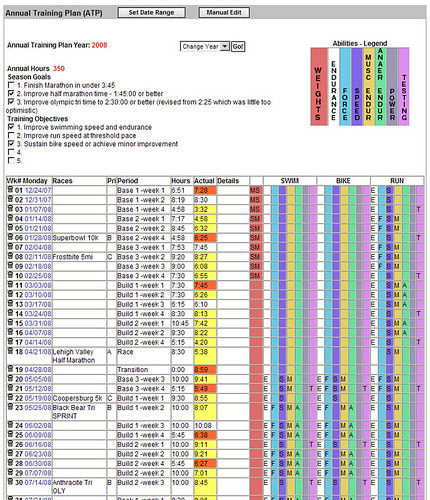
I'm not going to describe the whole Training Bible philosophy here, you can read it in the Training Bible books (note that new version of The Triathlete's Training Bible will be released soon, I suggest you to wait for it as Joe Friel made significant revisions to the book as he discusses on his blog. In short the season planning is done after your last priority A race in the previous season. The planning starts with setting the preferences for the next season like annual training hours, time frame, your personal data, then you are guided through setting the season goals and assessing your limiters. In the next step you plan individual races for the season and prioritize them as A, B or C events. Essentially the A events are the ones you will taper for and B, C events are either tune up races or testing races. It does not mean that you do not push hard in B or C race, it just helps you structure your plan. Once you set the races and their priorities the site will compute your annual training plan. The training plan basically spreads the annual training hours through out the season and assigns each week to a specific training phase (transition, preparation, base, build, peak, race). There is logic in the software that assigns the hours to each week according to the phase that you will be in during that week. You can adjust the annual training plan any time later or even re-calculate it during the season in case you need to re-assess due to unforeseen circumstances. The next step is to plan your week. The picture below shows the annual training plan that already has workouts logged against it (new one would be empty). Also note that the training plan has section for strength training, swim, bike and run and for each week you can determine which abilities you will work on (see the colorful bars at the top of the picture). The annual plan suggests the sports you need to work on based on the races you planned, but you can modify the plan as you see fit. There is much more that you can do with the plan, but as an introduction this is hopefully sufficient.

04 TrainingPeaks ATP


Planning training week

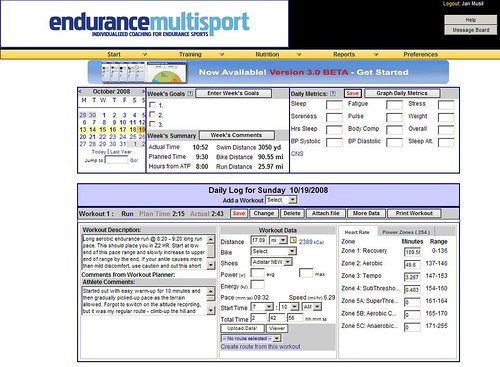
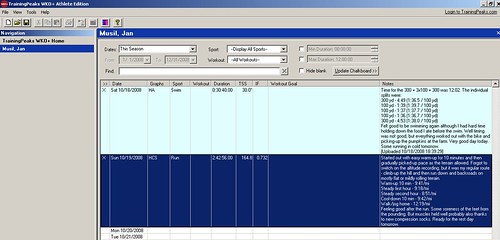
When I started training few years ago I used to put plan for the entire build-up to the A-race into the TrainingPeaks.com and it was typically a plan I derived from a book or combination of few canned plans. Few months ago I hired a coach and no longer do the detailed weekly planning. I receive them and execute them to the best of my ability. Typically my coach plans first few days of my week on Sunday the previous week and the rest in early part of the training week. There is a general schedule we agreed in the beginning that is pretty much dictated by my work and family commitments. If I have any changes to the general schedule or my status (like injury or sickness) I advise my coach via e-mail or through the TrainingPeaks.com site. The next picture shows the completed week (actually this is my last week) with individual workouts and instructions from my coach.

01 TrainingPeaks

The second picture shows one of the planned workouts. Besides having the workouts on-line the site also sends you e-mail (if you chose to) with the workouts for next two days. If you need to you can move workouts around (unless they are from your coach - then you need to ask for them to move it).

03 TrainingPeaks-workout

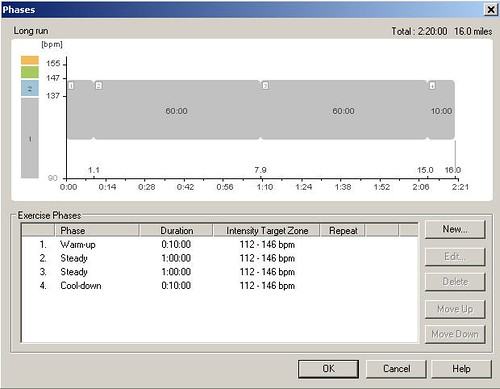
For more complex workouts or for workouts in which I want the HRM to monitor key parameters of the workout I create planned workout in PPT5. In the workout I set the limits as I need them in the specific workout - for cycling sessions it is generally HR, cadence or power (I use CS600 with power), for run sessions I use mostly HR limits. I do not plan swim sessions in the PPT5 as the S625X does not support guided workouts the same way RS800CX and CS600 do. Plus when I swim I just have a printout of the workout in a ziploc bag on the pool side and follow it - not a big need to have the watch beep at me. Example of workout in the PPT5 is below.

11 PPT5-workout-plan

The planned workout is then transferred to the HRM and I execute the training session according to the guidance. In case of simple workouts I use the Free workout type from the watch which does not have any guidance and is ideal for self-guided workout.


Workout analysis

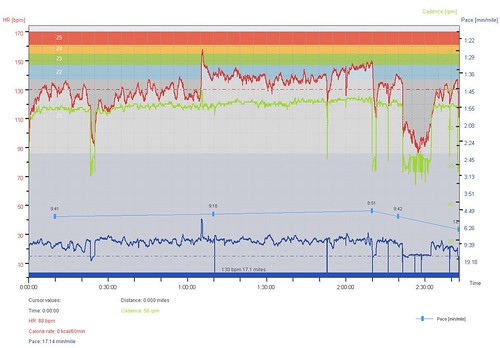
After the workout is complete I load it to the PPT5 and look at the key parameters of the workout. The PPT5 has been discussed in the previous articles so I'll not go into too much detail here. Typically the assessment consists of reviewing the pacing information, looking at whether I reached the workout goals and assessing where I had troubles. This may be a very short assessment for some workouts like easy recovery workout where I would only check if I went too hard at any point. For specific workouts like long bike, brick or long run I would look at the splits, power output (in cycling), pace, cadence and other variables on the chart shown below.

12 PPT5-workout-result

The PPT5 allows to change the selection (the thick blue bar under the graph) and select specific segment or segments (even non-continuus) and then review parameters for the selection. I may also add notes, laps and correct the errors in the recording (which does not happen often).

Once I'm done with the workout editing in the PPT5 I take the hrm file and load it to the WKO+. In the WKO+ I look at the overall training stress score (TSS) and intensity factor (IF). Note that the TSS and IF get only calculated for cycling workouts with power and running workouts with pace/distance data.

21 WKOplus-record-workout


Then I look at the individual parameters of the workout and review the power zones (for cycling) and HR zones (for running) on the screen shown below. I also tend to look at Mean Maximal Pace for runs and Mean Maximal Power for cycling sessions. The software is very flexible and lets you define additional graphs to review other parameters of the session.

22 WKOplus-workout-detail

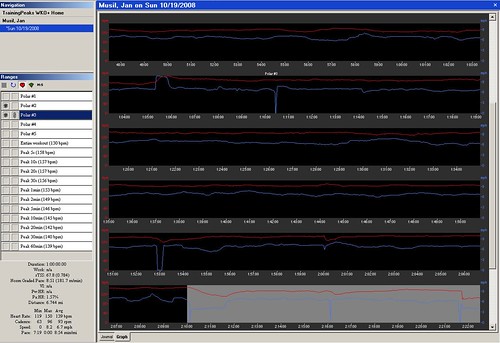
For majority of sessions I also look at the detailed graph and look at other parameters - like HR / power or HR / pace decoupling that is quite good way to assess your base in long steady state efforts. I may analyze cycling sessions to see how many candles I have burned - this is quite useful for race analysis to understand why you blew-up later on bike or did not have good run in triathlon race. There is just a lot you can derive from WKO+, but the software requires you to do good amount of reading of the manuals and I also recommend you to read Joe Friel's blog. Following picture shows the detailed graph of the session.

23 WKOplus-workout-graph

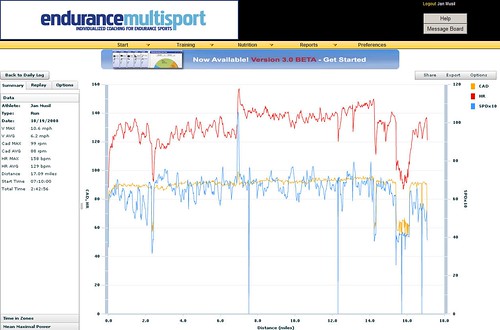
Last step in WKO+ is to load the workout results to the TrainingPeaks.com along with comments for my coach. The TrainingPeaks.com then lets my coach review the workout in detail and if I want I can share the workout with my friends via Facebook or just send people link to the workout details.

42 TP Results analysis

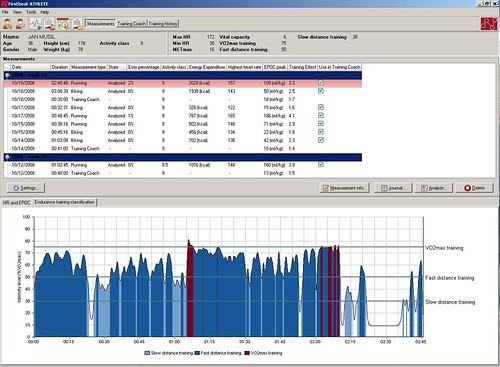
After that I take the R-R file from the workout and dump it into the FB Athlete for very quick assessment. I do not rely much on the FB Athlete in my training and use it to assess and cross-validate the overall weekly load. The FB Athlete computes EPOC and Training Effect for individual workouts and that is all I use it for. I do not utilize the Training Coach function. Here is a picture of the FB Athlete page.

32 FB Measurement graph

For some workouts I review the graph showing which part of the workout I spent in which VO2 zone. It is interesting to see where I labored more than I should have. But I do not really rely much on the FB Athlete results and use them only as additional info.


Week, month and season assessment

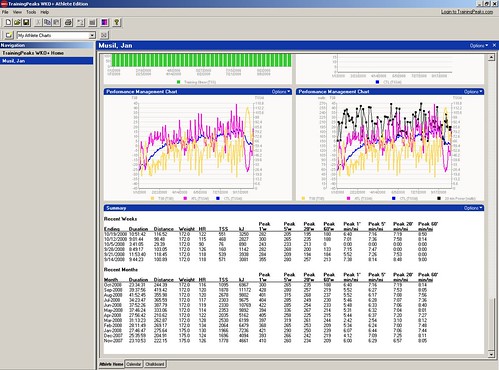
On regular basis I review the weekly, monthly and entire season statistics. Most useful are the graphs I get from the WKO+. The program comes with pre-defined set of graphs that you can modify or add new ones to analyze your entire season, previous few days or specific date range. I have bunch of graphs on my overview page that show me weekly training volume and time for the season, HR distribution for the entire season and then the same graphs for each sport. For cycling I have a section that shows distribution of power in automatic buckets and also in training zones, mean maximal power over the previous month with mean heart rate, mean maximal power and mean maximal pace for the season and week, training stress and intensity factor for biking and running, cadence for biking and running, performance management chart and summary of the training with weekly and monthly average HR, TSS, power and pace. If you want other stats you can play around with the graphs and get them displayed on your athlete page in the WKO+. Sample of the page is below - not all graphs are displayed. Again as for other WKO+ related details read the WKO+ help on-line.

24 WKOplus-season-graphs

Second area where I look for overall data about the training volume is the TrainingPeaks.com - the Annual Training Plan shown on the first picture in this article shows the volume per week. The Actual field then indicates with color code whether I trained just enough (no background), more (red) or less (yellow) that planned.

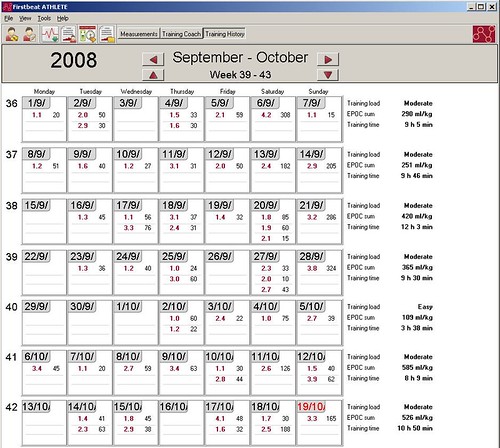
As a secondary information for my weekly load I look at the overall EPOC for the week in the FB Athlete. The summary of the week is on the right side of the picture below.

34 FB Training History

If I used the FB Athlete for training planning I could also look at the training plan that dynamically changes as the workout results get loaded to the software. According to the software help the recommended training sessions should be taken as recommended durations and TE levels. If you need more time to achieve the TE you can take more time. I did not do any analysis of this function so I can not really comment on this.

This is in nutshell how I use the software to help me train. I must admit that I'm a geek and enjoy playing around with gadgets and hoard data that I can later review and analyze. It is important to say that you do not need to do all this to be successful. The most important part of all this is actually me working with personal coach. The rest is just making it more fun for me to train...